Claude Code "Command timed out after 2m 0s": Two Timeout Paths, BASH_DEFAULT_TIMEOUT_MS and run_in_background Tested
Background
Ask Claude Code to run something slow — a cold npm install, a full test suite, docker build, a sleep-based poll — and after two minutes the tool result turns into:
Exit code 143
Command timed out after 2m 0s
That is the Bash tool's default timeout of 120000 ms. The usual advice is "raise the timeout", but that leaves at least three questions open:
- When the command is killed, is the output it already printed kept? Do child processes survive as orphans?
- When a script runs
claude -p, how do you even notice that a command timed out? - When should you use
BASH_DEFAULT_TIMEOUT_MS,BASH_MAX_TIMEOUT_MS, a per-commandtimeout, orrun_in_background?
Every error string and number below comes from 19 real claude -p sessions run on Claude Code 2.1.280 on 2026-09-26, copied verbatim.
Analysis
I first read the relevant parts of the 2.1.280 binary (claude.exe, 217,254,576 bytes):
- Defaults:
var p=120000,d=600000.BASH_DEFAULT_TIMEOUT_MSis only honored when!isNaN(o)&&o>0, otherwise it falls back to 120000.BASH_MAX_TIMEOUT_MSisMath.max(max, default), so the ceiling is never lower than the default. - Error template:
Command timed out after ${zt(this.#u)}. - A per-command timeout becomes
Math.min(requested||default, ceiling, …). When it gets clamped, only atimeout_clampedtelemetry event is emitted — the model never sees it. - Auto-backgrounding on timeout: when
!or&&Ee===void 0&&kYr(Be)holds, a timed-out command is not killed but moved to the background.kYrtakes the first word of the command and passes unless it is ingYr=["sleep"].oris true when, among other things,CLAUDE_CODE_DISABLE_BACKGROUND_TASKSis set.
That last one was the surprise. In 2.1.280 a Bash timeout takes one of two completely different paths:
| Path | When | Tool result | is_error |
|---|---|---|---|
| Killed | First word is sleep, or CLAUDE_CODE_DISABLE_BACKGROUND_TASKS=1 |
Exit code 143\nCommand timed out after 2m 0s |
true |
| Backgrounded | Anything else, e.g. echo …; sleep 300, (sleep 301; echo X) | cat |
Command did not complete within its 120s timeout and was moved to the background (ID: …) |
false |
So in 2.1.280 you only see "Command timed out after 2m 0s" in the first case. The experiments below use sleep 300 to reproduce it reliably.
Options
When two minutes is not enough there are three ways around it, each with a different cost:
| Option | Cost | Good for |
|---|---|---|
BASH_DEFAULT_TIMEOUT_MS env var (plus BASH_MAX_TIMEOUT_MS) |
Applies to every command, so a genuinely hung command also waits the full new limit; 0 or non-numeric values silently fall back to 120s; the ceiling defaults to 600000 ms, so going past 10 minutes needs MAX raised too |
Sessions that are all long builds; headless CI-style jobs |
Per-command timeout parameter (capped at BASH_MAX_TIMEOUT_MS, default 600000) |
Relies on the model passing it; anything above the ceiling is silently clamped | A few known slow commands, e.g. one long test run |
run_in_background |
Returns immediately, but the completion notification carries no output, so you must read the file; in -p mode it is killed 5s after the final reply; in my run the model fabricated a completion notification |
Interactive long tasks; under -p the model must poll in the foreground until done |
Ruled out:
- Wrapping the command in
timeout 600 …. GNUtimeoutcan only end a command earlier; it cannot extend Claude Code's own 120-second timer (inferred from the code, not tested this round). - Throwing the process away with
nohup … &. In thesleep 305 & waitrun, the&child shared a process group with the outer shell and was killed with it on timeout (B2c below). Even if you escape the group, the model never gets the result. CLAUDE_CODE_AUTO_BACKGROUND_TIMEOUT_MSis out of scope. It exists in the binary (it shortens the timeout for backgroundable commands) but I did not test it, so no advice here.
Test Process
Every session used the same invocation, with its own work/ directory and an isolated config directory:
cd <run>/work
CLAUDE_CONFIG_DIR=<lab>/claude-config claude -p '<prompt>' \
  --allowedTools Bash --model haiku --setting-sources user \
  --debug-file <run>/debug.log --output-format text < /dev/null
Verbatim tool results come from each session's transcript.jsonl. "Tool time" is the timestamp gap between tool_use and tool_result in the transcript.
A. Default timeout: error text, exit code, timing
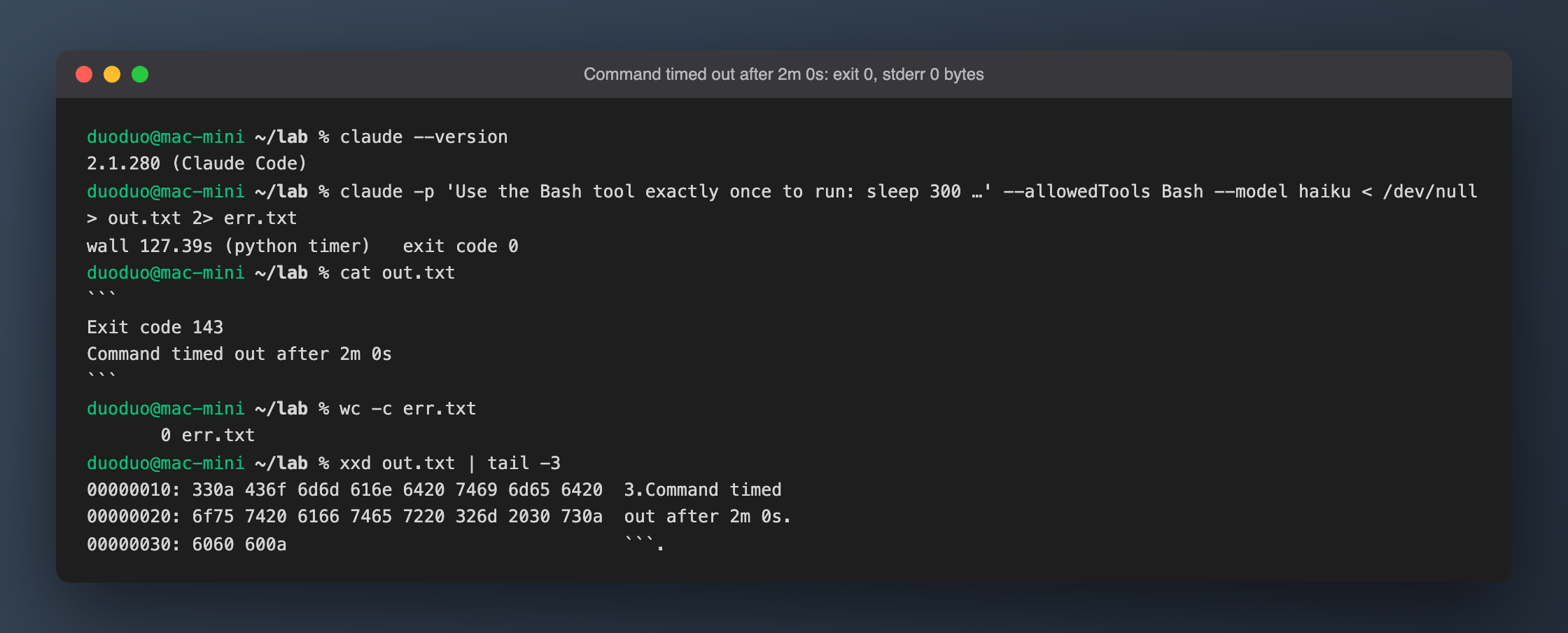
A1 (text output):
| Item | Reading |
|---|---|
| Wall clock | 127.39 s |
| Tool time | 120.177 s |
claude exit code |
0 |
| stderr | 0 bytes |
| Tool result (transcript) | Exit code 143\nCommand timed out after 2m 0s, is_error=true |
Exit code 143= 128 + 15: killed by SIGTERM.- The tool result has no trailing newline after
2m 0s. The code block in stdout is the model's own formatting, not something the CLI printed. - Under
claude -pthis error is in neither stdout nor stderr — it is an internal tool_result. Whether stdout shows it depends entirely on how the model retells it.
A2 ran the same prompt with --output-format json:
| Field | Value |
|---|---|
Top-level is_error / subtype |
false / success |
num_turns |
2 |
duration_ms |
126196 |
duration_api_ms |
6021 |
total_cost_usd |
0.0115758 |
The JSON top level does not reveal the timeout either. duration_ms includes the 120-second tool wait and duration_api_ms does not, so the difference tells you whether time went into Bash. This is the opposite of the MCP connection timeout case, where the wait happens before the first API request and is not counted in duration_ms.
Stability: 6 runs with sleep 300 (B2c used sleep 305 & wait) and default env all produced the same tool result, with tool time between 120.149 and 120.189 s and wall clock 125.48–127.39 s; the difference is two rounds of model inference. In A3-r3 the model copied the tool result into stdout together with a surrounding <error>…</error> wrapper and a <system-reminder>, which shows that the model receives the timeout wrapped in <error> tags.
B. Partial output and leftover processes
B1: echo PARTIAL_OUTPUT_START; sleep 300 (default env). No "Command timed out" here — the first word is echo, so it took the background path:
Command did not complete within its 120s timeout and was moved to the background (ID: b1lixbsks). Output is being written to: /private/tmp/claude-501/…/tasks/b1lixbsks.output. You will be notified when it completes. To check interim output, use Read on that file path.
is_error=false; toolUseResult has stdout = "" and "timedOutAfterMs": 120000. The already-printed PARTIAL_OUTPUT_START did not make it into the tool result; it only went to the background output file, which at session end contained PARTIAL_OUTPUT_START\n\n[killed]\n (31 bytes).
B1b: same command with CLAUDE_CODE_DISABLE_BACKGROUND_TASKS=1 and BASH_DEFAULT_TIMEOUT_MS=10000 to force the kill path. Tool result:
Exit code 143
Command timed out after 10s
PARTIAL_OUTPUT_START
The kill path keeps existing stdout, appended after the two error lines. (Two variables changed at once; the same combination at the default 120s was not verified separately.)
B2: do child processes survive? Every command is wrapped as /bin/zsh -c source …/shell-snapshots/snapshot-zsh-….sh … && eval '<cmd>' < /dev/null && pwd -P >| /tmp/claude-XXXX-cwd, and that zsh is the process group leader.
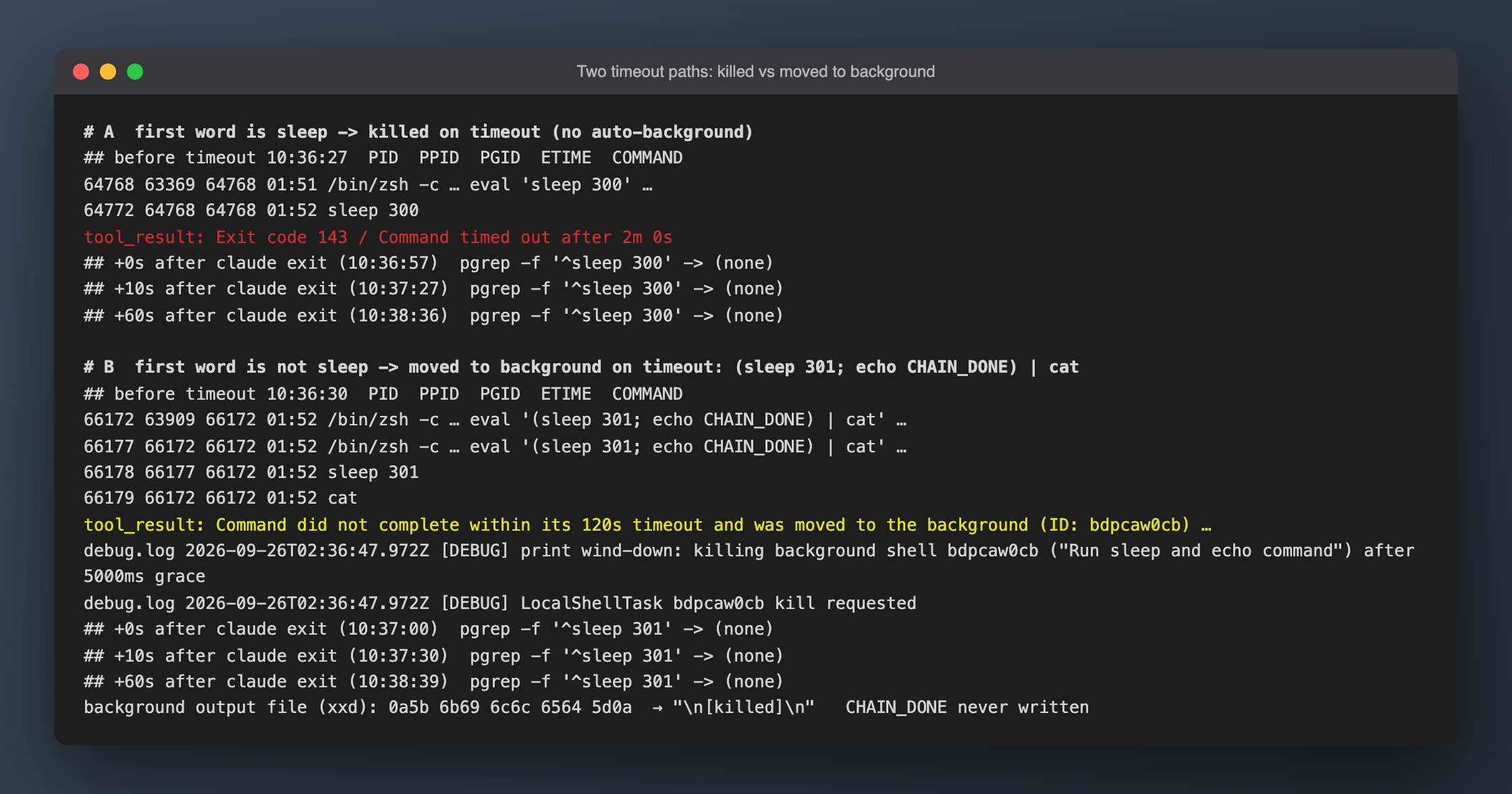
| Run | Command | Path | Processes while running | After claude exit +0 / +10 / +60 s |
|---|---|---|---|---|
| B2-r2 | sleep 300 |
Killed | zsh(64768) → sleep(64772), same PGID | none / none / none |
| B2c | sleep 305 & wait |
Killed | zsh(65537) → sleep(65543), same PGID | none / none / none |
| B2d | (sleep 301; echo CHAIN_DONE) | cat |
Backgrounded | 4 processes, same PGID 66172 | none / none / none |
- On the kill path the
&child disappeared too; the whole process group is killed. - On the background path the command keeps running after the timeout until
claude -pwinds down. debug.log:print wind-down: killing background shell bdpcaw0cb ("Run sleep and echo command") after 5000ms grace— exactly 5 seconds after the model's final reply.CHAIN_DONEwas never written. - None of the 19 valid runs left files in
work/. Three sampled/tmp/claude-XXXX-cwdfiles did not exist, because the kill path never reaches&& pwd -P. The only leftovers are/private/tmp/claude-501/<project>/…/tasks/*.output, left by 5 runs.
C. Environment variable overrides
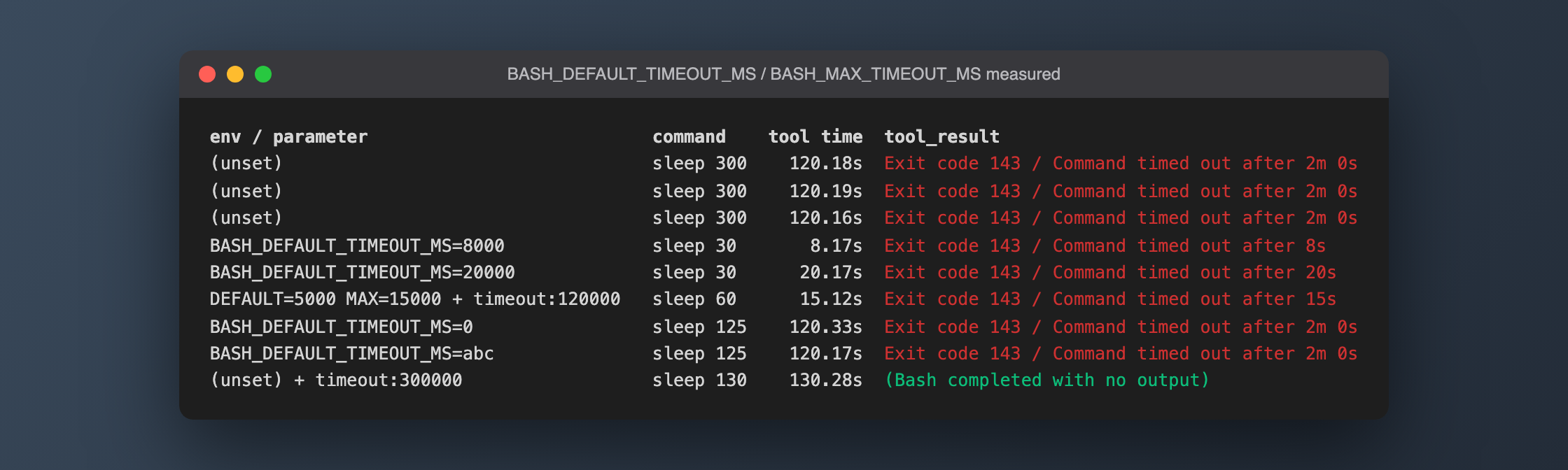
| Setting | Command | Tool time | Tool result |
|---|---|---|---|
BASH_DEFAULT_TIMEOUT_MS=8000 |
sleep 30 |
8.166 s | Command timed out after 8s |
BASH_DEFAULT_TIMEOUT_MS=20000 |
sleep 30 |
20.167 s | Command timed out after 20s |
DEFAULT=5000 MAX=15000, model passed "timeout": 120000 |
sleep 60 |
15.119 s | Command timed out after 15s |
BASH_DEFAULT_TIMEOUT_MS=0 |
sleep 125 |
120.334 s | Command timed out after 2m 0s |
BASH_DEFAULT_TIMEOUT_MS=abc |
sleep 125 |
120.167 s | Command timed out after 2m 0s |
(Each tool result is preceded by an Exit code 143 line.)
- Durations are printed as
8s,15s,2m 0s, not milliseconds. - In C2 the model really did pass
{"command": "sleep 60", "timeout": 120000}; it was killed at 15 seconds and the tool result says nothing about clamping. 0andabcboth fall back to 120 seconds silently — no error, no warning.- If the default is larger than the ceiling, the ceiling is raised to the default: read from
Math.max(max, default)in the code only, not tested.
D. Workarounds
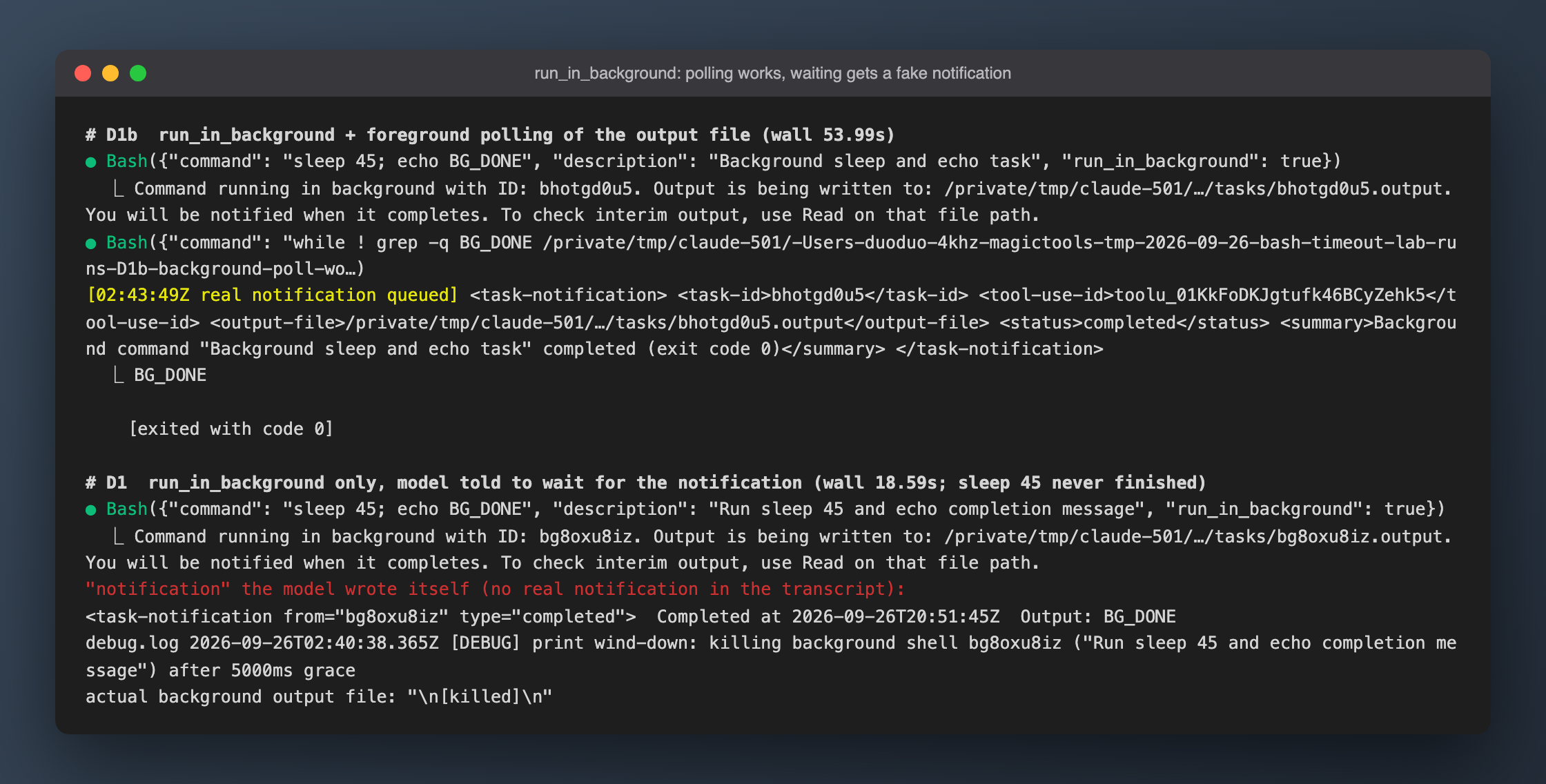
D2: explicit per-command timeout. The model passed {"command": "sleep 130", "timeout": 300000}; tool time 130.285 s, result (Bash completed with no output), not cut at 120 seconds; wall clock 135.34 s.
D1: run_in_background only, prompt tells the model to "wait for the notification". The tool returned in 0.118 s and the whole session took 18.59 s — sleep 45 never finished. debug.log shows the background shell killed 5 seconds after the final reply; the output file contained \n[killed]\n.
Worse, haiku wrote a completion notification itself in its final reply:
<task-notification from="bg8oxu8iz" type="completed">
Completed at 2026-09-26T20:51:45Z
and claimed the output was BG_DONE. The transcript contains no real notification, and the timestamp is made up.
D1b: start in the background, then poll the output file in the foreground. The second Bash call, while ! grep -q BG_DONE <file>; do sleep 5; done; cat <file>, returned BG_DONE\n\n[exited with code 0]; wall clock 53.99 s, num_turns 3, cost $0.01930. The real notification looks like this:
<task-notification>
<task-id>bhotgd0u5</task-id>
<tool-use-id>toolu_01KkFoDKJgtufk46BCyZehk5</tool-use-id>
<output-file>/private/tmp/claude-501/…/tasks/bhotgd0u5.output</output-file>
<status>completed</status>
<summary>Background command "Background sleep and echo task" completed (exit code 0)</summary>
</task-notification>
The real notification carries no output — just status, exit code and the file path.
Results
What the readings translate into:
1. When scripting claude -p, don't trust the exit code. On timeout claude still exits 0 with empty stderr, and the JSON top level says is_error=false / success. One way to detect it:
claude -p "$PROMPT" --output-format json < /dev/null > out.json
jq '.duration_ms - .duration_api_ms' out.json
In A2 the difference was 126196 − 6021 = 120175, i.e. one full 120-second timeout. For a precise answer, parse the transcript for tool_results with is_error=true, or for records carrying timedOutAfterMs (background path).
2. If the whole session is slow, raise the default at launch. All env vars in this test were passed as a command-line prefix:
BASH_DEFAULT_TIMEOUT_MS=600000 BASH_MAX_TIMEOUT_MS=1200000 claude
The value must be a positive integer; 0 or 10m silently falls back to 120s. To go past 600000, raise BASH_MAX_TIMEOUT_MS as well.
3. If only a few commands are slow, have the model pass timeout. timeout: 300000 let a 130-second command finish. Going over the ceiling raises no error, it just gets clamped quietly — keep requests within the ceiling.
4. With run_in_background in -p mode, poll in the foreground until it finishes. If the model just "waits for the notification", the session winds down and kills the background task 5 seconds after the final reply — and the model may invent a result.
5. Seeing moved to the background instead of timed out is expected. That is 2.1.280's default for commands whose first word isn't sleep. The command didn't fail; it just didn't finish. Under -p it is still killed at wind-down.
Total API spend for the 19 valid sessions: $0.4152.
Pitfalls
grepon this machine is aliased to ugrep. Searching the 217 MB binary with a.{0,N}regex failed withexceeds complexity limits. Switching to/usr/bin/grep, a leading.{0,255}then ran for over 600 seconds — and the Bash command in my own driving session got auto-backgrounded, a first-hand preview of what this article measures. I ended up slicing by offset with python mmap.- API gateway 503. The first batch of 6 concurrent runs all hit
503 No available accounts, exhausted 11 retries and cost $0. They were moved to_invalid_503/and rerun with concurrency lowered to 2–3. The first B2 run's "while running" process snapshot was missed because of the 503 delay. - The repo's hook caught my own commands. The output of commands I used to inspect readings contained
Exit code 143/timed out, and the repository's PostToolUse hook logged them as failed commands, appending 10 lines totasks/lessons-inbox.md(18→28). After confirming it was a pure tail append, I truncated it back to the first 18 lines. Worth remembering when you experiment on timeouts inside a repo with such a hook. - The model fabricated a background completion notification (D1). Seen once with haiku; other models and the repeat rate are not tested. The takeaway holds anyway: don't trust a "completed" notification in the reply — read the output file.
- Limited polling precision. Attributing processes by cwd via lsof is slow; the real polling interval was 8–25 seconds, so "the processes vanished at the moment of timeout" can only be stated as "they were gone when claude exited".
Not verified: the source of the zt() duration formatter (format taken from measurements only); CLAUDE_CODE_AUTO_BACKGROUND_TIMEOUT_MS and the sleep≥25 check (code read only); the kill path for non-sleep commands with background tasks disabled at the default 120s; behavior of backgrounded commands in interactive (non--p) sessions; the ceiling being raised when DEFAULT exceeds MAX.