Claude Code MCP server Failed to connect: CONNECTION_CLOSED, connection timed out after 30000ms and ENOENT, reproduced one by one
Background
You add an MCP server to Claude Code, run claude mcp list, and get:
✘ Failed to connect — CONNECTION_CLOSED: Connection closed
Or ENOENT, or connection timed out after 30000ms, or ECONNREFUSED, or claude -p refusing to start with Error: Invalid MCP configuration:. All of them mean the same thing — "can't connect" — and none of them tells you what to fix.
This post turns "can't connect" back into specific, checkable causes: which exact error text each cause produces, how to tell them apart in about a minute, and what fixes each one. Every error string below was captured verbatim from real runs on my machine on 2026-09-24.
What can actually go wrong
Getting from a config entry to a usable MCP server takes four steps, and each fails with a different error:
- Read the config — does the
--mcp-configfile exist, is it valid JSON, is the shape right - Spawn / connect — a stdio server spawns a command (missing command → ENOENT); an http/sse server connects to a URL (nothing listening → ECONNREFUSED)
- Stay alive — if the process exits right away, all Claude Code sees is a closed pipe:
CONNECTION_CLOSED - MCP handshake — the process is alive but must answer
initializebefore the timeout, or you getCONNECT_TIMEOUT
Steps 3 and 4 are the hard ones: the error tells you where it failed, never why. That's also where the most useful findings of this experiment are.
Approach and what I ruled out
Every server under test is a hand-written stub, three in total:
good-server.mjs— a 17-line, zero-dependency MCP stdio server implementing onlyinitialize/tools/list/tools/call, with a singleechotool that returnsLAB-ECHO:<text>exit1-server.sh— printslab-exit1: fatal: missing LAB_API_KEY, refusing to startto stderr, thenexit 1hang-server.mjs— prints one line to stderr and then never replies; exits by itself after 300 seconds
Ruled out: testing with real third-party MCP servers. When a real server fails, the failure is tangled up with its own logic, network and dependency versions, so you can't tell which layer broke. npx -y also downloads code at run time, which makes runs unreproducible and adds supply-chain risk. Stubs change exactly one variable per case, and the LAB-ECHO: prefix proves a tool result really came from the server rather than being made up by the model.
Ruled out: testing against my real config. My ~/.claude.json has real servers configured. Mixing them in would make it impossible to tell who is failing, and breaking them would break my daily setup. So each case gets its own empty CLAUDE_CONFIG_DIR (user-scoped servers go into a .claude.json inside that temp directory), and every claude -p run uses --mcp-config <temp json> --strict-mcp-config, except the one run that deliberately drops strict to test what it does.
Two ways of observing:
claude mcp listfor the health-check text. It's free, so I ran it as often as needed, always with--debug-file, recording exit code and wall timeclaude -pfor the effect on the model side, capped at 8 runs total. Every run gets< /dev/null(otherwise the CLI waits 3 seconds for stdin first, which ruins latency numbers) and--output-format stream-json --verbose, which gives server status and the tool list from the init message, plusduration_ms/num_turns/total_cost_usdfrom the result
Environment: Claude Code 2.1.280 (native Mach-O binary), macOS 26.3.1, Node v25.9.0. The model actually used by -p was claude-opus-5-5[1m], through a third-party ANTHROPIC_BASE_URL.
The experiments
Case 1: the command doesn't exist
The stdio server's command points at /nonexistent/mcp-server. claude mcp list (exit 0, 0.16s wall):
Checking MCP server health…

ghost: /nonexistent/mcp-server  - ✘ Failed to connect — ENOENT: ENOENT: no such file or directory, posix_spawn '/nonexistent/mcp-server'
Under claude -p, this server ran together with the other broken ones (see case 7). stderr was empty; the init message only said 'status': 'failed'. The debug log said:
2026-09-24T02:06:21.642Z [DEBUG] MCP server "ghost": Connection failed after 3ms (ENOENT): ENOENT: no such file or directory, posix_spawn 'stdio'
Same config, but mcp list shows the real path (posix_spawn '/nonexistent/mcp-server') while the -p log shows posix_spawn 'stdio'. Under -p, the error does not include the path you got wrong — go back to mcp list to see it.
⚠️ Not measured: the exit code and timing of a standalone
claude -prun with only this server configured. I forgot to create that config file before the run, so that call captured "config file not found" instead (see case 5), and it used up the last of my 8-pruns. The only-pdata for this server comes from the mixed group: it failed in 3ms.
Case 2: the interpreter isn't on PATH
To simulate launching claude from somewhere without Homebrew on PATH (an IDE, launchd…), I ran claude mcp list under env -i HOME=$HOME PATH=/usr/bin:/bin and changed only the command field:
| case | command |
result | wall |
|---|---|---|---|
| 02a | node |
✘ Failed to connect — ENOENT: Executable not found in $PATH: "node" |
0.69s |
| 02b | npx |
✘ Failed to connect — ENOENT: Executable not found in $PATH: "npx" |
0.67s |
| 02c | /opt/homebrew/bin/node (absolute interpreter path) |
✔ Connected |
0.76s |
| 02d | stubs/good-server.mjs (absolute script path, shebang #!/usr/bin/env node) |
✘ Failed to connect — CONNECTION_CLOSED: Connection closed |
0.70s |
| 02e | node, plus "env":{"PATH":"/opt/homebrew/bin:/usr/bin:/bin"} in the config |
✔ Connected |
0.76s |
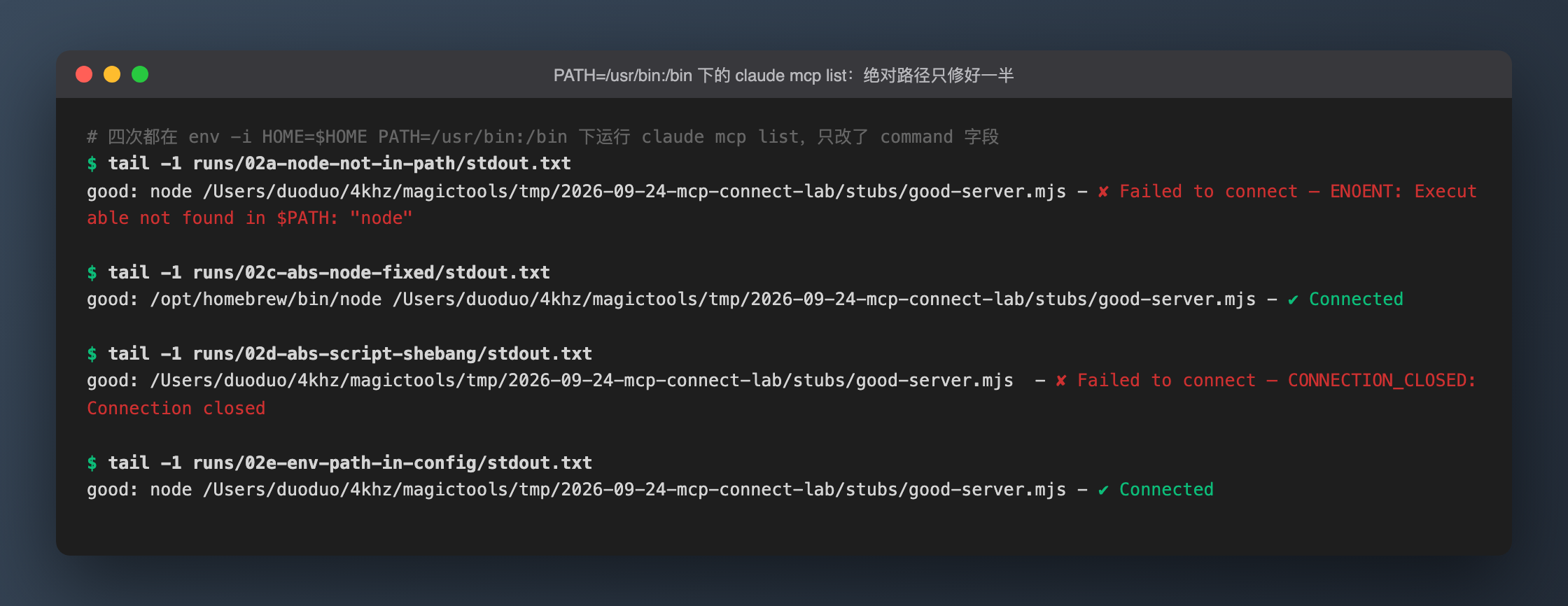 Output of
 claude mcp list run under env -i HOME=$HOME PATH=/usr/bin:/bin — cases 02a / 02c / 02d / 02e in order, taken with tail -1 from each case's stdout.txt.
02d is the one that bites. Switching to an absolute script path looks like a fix, but it only gets you halfway: the env node in the shebang still searches the same PATH. mcp list only says CONNECTION_CLOSED; the real cause is in the debug log:
2026-09-24T02:04:56.121Z [ERROR] MCP server "good" Server stderr: env: node: No such file or directory
Running the script directly under the same PATH gives exit=127 with env: node: No such file or directory on stderr.
Fix (both verified, 02c and 02e): use the absolute path of the interpreter as command, or add the directory to that server's env.PATH — the config's env.PATH is used for command lookup too.
Case 3: the server exits immediately
claude mcp list (exit 0, 0.60s wall):
crashy: /Users/duoduo/4khz/magictools/tmp/2026-09-24-mcp-connect-lab/stubs/exit1-server.sh - ✘ Failed to connect — CONNECTION_CLOSED: Connection closed
No exit code, no signal. Only with --debug-file do you see what the server actually wrote to stderr:
2026-09-24T02:04:50.394Z [DEBUG] MCP server "crashy": Starting connection with timeout of 30000ms
2026-09-24T02:04:50.397Z [ERROR] MCP server "crashy" Server stderr: lab-exit1: fatal: missing LAB_API_KEY, refusing to start
2026-09-24T02:04:50.398Z [DEBUG] MCP server "crashy": Connection failed after 4ms (CONNECTION_CLOSED): Connection closed
Case 4: the server is alive but never answers the handshake
The default timeout is 30 seconds; mcp list took 30.19s wall:
hangy: /Users/duoduo/4khz/magictools/tmp/2026-09-24-mcp-connect-lab/stubs/hang-server.mjs - ✘ Failed to connect — MCP server "hangy" connection timed out after 30000ms
2026-09-24T02:04:56.854Z [DEBUG] MCP server "hangy": Starting connection with timeout of 30000ms
2026-09-24T02:05:26.859Z [DEBUG] MCP server "hangy": Connection timeout triggered after 30005ms (limit: 30000ms)
2026-09-24T02:05:26.865Z [DEBUG] MCP server "hangy": Connection failed after 30007ms (CONNECT_TIMEOUT): MCP server "hangy" connection timed out after 30000ms
MCP_TIMEOUT=5000 cuts this to 5.18s wall, with the message changing to connection timed out after 5000ms — handy for reproducing quickly.
Leftover processes: after mcp list timed out and exited, the stub was still running, re-parented to init:
  PID  PPID ELAPSED COMMAND
72132     1   00:36 node /Users/duoduo/4khz/magictools/tmp/2026-09-24-mcp-connect-lab/stubs/hang-server.mjs
After the MCP_TIMEOUT=5000 run there were two of them (72132 and 72250). The stub keeps Node's default SIGTERM behavior (exit on receipt), so its survival means mcp list did not send it SIGTERM before exiting. By contrast, none of the four claude -p runs left a stub process behind.
⚠️ Scope: my hang stub does not exit on stdin EOF. Well-behaved MCP servers usually exit when stdin closes, so the "leaves orphan processes" finding only applies to servers that are stuck and ignore stdin EOF. I didn't test whether a normal server is left behind after a timeout.
Case 5: the --mcp-config itself is wrong
All three variants exit with code 1, empty stdout, in about a tenth of a second — not even the --debug-file log gets created — so they fail while reading the config, before getting anywhere near a request:
Invalid JSON (trailing comma, 0.14s):
Error: Invalid MCP configuration:
MCP config is not a valid JSON
Top-level key misspelled as mcpServer (0.10s):
Error: Invalid MCP configuration:
mcpServers: Invalid input
File path doesn't exist (0.11s — this is the accidental call from case 1):
Error: Invalid MCP configuration:
MCP config file not found: /Users/duoduo/4khz/magictools/tmp/2026-09-24-mcp-connect-lab/configs/ghost-only.json
The syntax error comes without a line number — use jq . <file> or python3 -m json.tool <file> to find it.
What --strict-mcp-config does: I put a user-scoped server called usercanary into the isolated config dir's .claude.json. With strict, init lists only good. Without it, init lists usercanary (source: user) plus good (source: dynamic), and the tools are ['mcp__good__echo', 'mcp__usercanary__echo']. So without strict, --mcp-config is added on top of your existing config, not a replacement.
Also: claude mcp list --help shows -h as its only option. It doesn't accept --mcp-config and only reads saved configuration, so servers passed via --mcp-config not showing up in mcp list is expected — it doesn't mean the config didn't take effect.
Case 6: http / sse pointed at a dead port
deadhttp: http://127.0.0.1:9/mcp (HTTP) - ✘ Failed to connect — ECONNREFUSED: ECONNREFUSED: Unable to connect. Is the computer able to access the url?
deadsse: http://127.0.0.1:9/sse (SSE) - ✘ Failed to connect — SSE error: ECONNREFUSED: Unable to connect. Is the computer able to access the url?
Both took 0.16s wall. Inside a claude -p session, failed remote transports keep reconnecting: deadhttp logged Starting connection 4 times in one run and 3 in the other, each failing instantly with ECONNREFUSED. The debug log also prints environment details such as "HTTP_PROXY":"not set", useful when chasing proxy problems.
Case 7: what broken servers do to the model side
Both groups got the same prompt — call mcp__good__echo("ping"), compute 17*23, list every mcp__ tool — twice each. The "bad" group added the five broken servers from cases 1/3/4/6 on top of the good one.
| run | wall | duration_ms | num_turns | total_cost_usd |
|---|---|---|---|---|
| good-1 | 5.36s | 5056 | 2 | 0.2702058 |
| good-2 | 3.90s | 3591 | 2 | 0.0222042 |
| bad-1 | 37.90s | 7622 | 2 | 0.0222042 |
| bad-2 | 34.52s | 4238 | 2 | 0.0222042 |
| median, good | 4.63s | 4323.5 | 2 | 0.1462050 |
| median, bad | 36.21s | 5930 | 2 | 0.0222042 |
All four runs returned the identical result: LAB-ECHO:ping / 391 / mcp__good__echo. In the bad group, all five broken servers showed 'status': 'failed' in init and the tool list contained only mcp__good__echo. The task still completes; broken servers just contribute no tools.
The slowdown is visible in the debug log: in the good group, the first [API REQUEST] comes about 0.2s after the first log line; in the bad group it comes about 30.2s later (02:06:21.489 → 02:06:51.699) — exactly hangy's 30-second timeout. claude -p waits for every server to connect or time out before sending its first API request. ENOENT, exit 1 and ECONNREFUSED all failed within 3–36ms; the one server that never answers the handshake is the only thing slowing startup down.
⚠️ Not verified: good-1 cost $0.2702058, far more than the $0.0222042 of the other three. My guess is a cache write on the first call with this tool set, but I didn't check the usage fields, so the good-group cost median is inflated by that one run — it does not mean broken servers make runs cheaper. What is established: both bad runs cost exactly the same as good-2, so failed servers add no tokens.
Case 8: proving the fixed path actually works
In the good group, init shows {'name': 'good', 'status': 'connected'} and the model actually called the tool. The LAB-ECHO:ping it got back can only come from good-server.mjs:
2026-09-24T02:06:21.661Z [DEBUG] MCP server "good": Successfully connected (transport: stdio) in 23ms
2026-09-24T02:06:55.788Z [DEBUG] MCP server "good": Calling MCP tool: echo
2026-09-24T02:06:55.795Z [DEBUG] MCP server "good": Tool 'echo' completed successfully in 7ms
For the PATH problems, the before/after is in case 2: 02a fails, 02c and 02e both show ✔ Connected.
Results
One CONNECTION_CLOSED, two unrelated causes
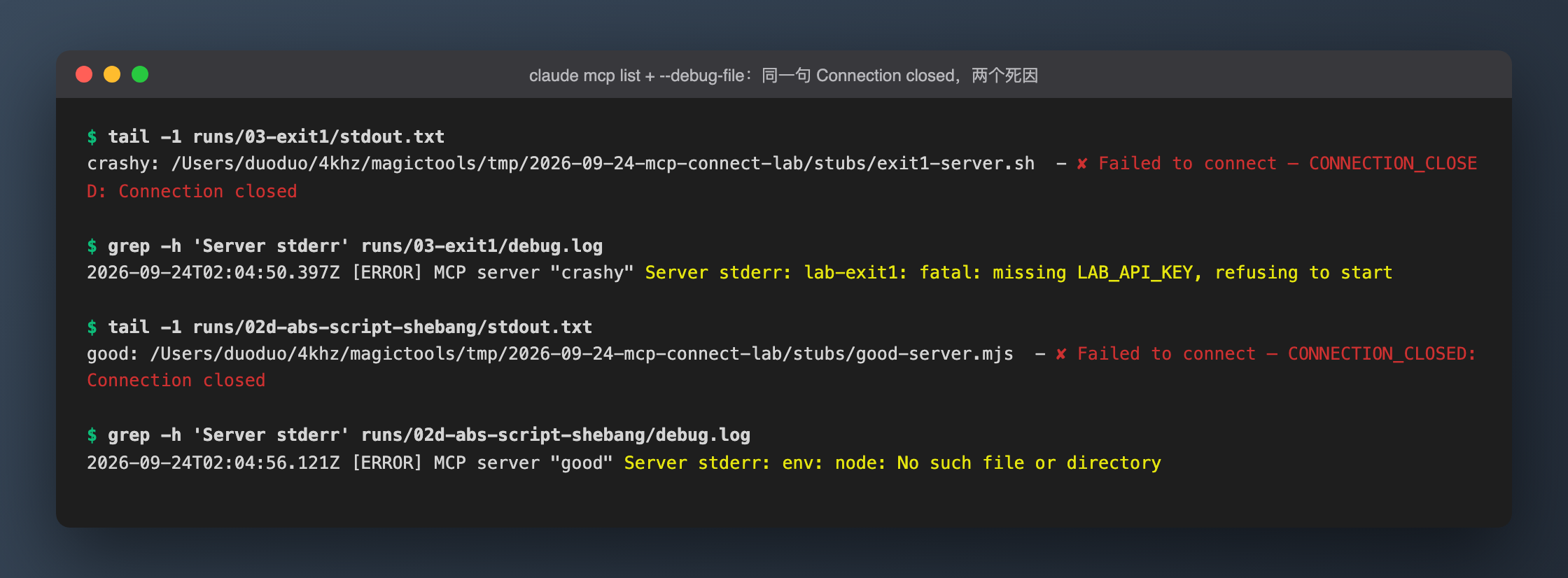 Case 3 and case 2d produce identical
 claude mcp list output (tail -1 stdout.txt). Only grepping the --debug-file log for Server stderr tells them apart: one is missing an env var, the other can't find node.
If you take one thing from this post: when you see CONNECTION_CLOSED, don't guess — get the stderr first:
claude --debug-file /tmp/mcp.log mcp list
grep 'Server stderr' /tmp/mcp.log
36 seconds of wall time, 5.9 seconds of duration_ms
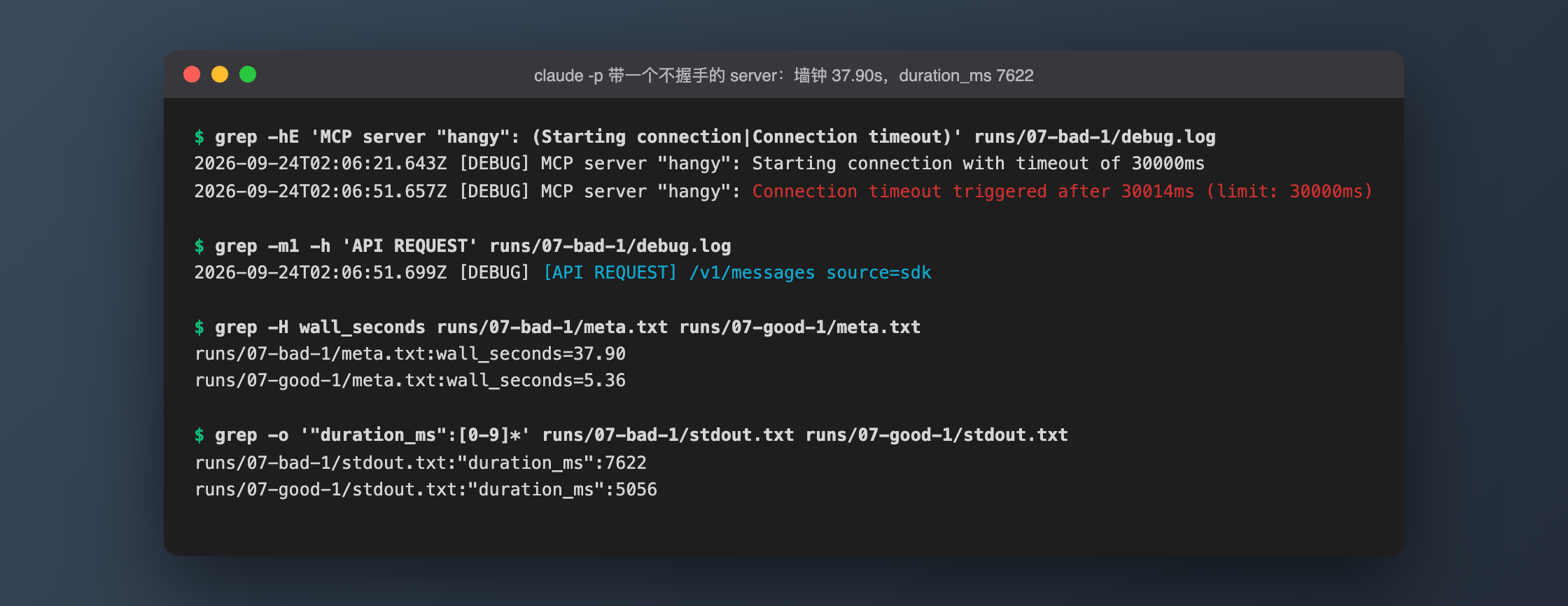 From the bad-1
 claude -p debug log: hangy goes from starting the connection to timing out in exactly 30 seconds, and the first API request follows right after. Below: wall time (meta.txt) and stream-json duration_ms for bad-1 and good-1.
Medians across both groups: wall time 36.21s vs 4.63s, duration_ms 5930 vs 4323.5. If your monitoring or benchmarks only read duration_ms from the JSON output, those 30 seconds never show up.
Cheat sheet: error text → what to check first
| Error text (key fragment) | Cause | One-minute check |
|---|---|---|
ENOENT: no such file or directory, posix_spawn '<path>' (shows as 'stdio' in -p logs) |
command path doesn't exist |
ls -l <command> |
ENOENT: Executable not found in $PATH: "node" / "npx" |
the command isn't on the PATH claude was launched with |
check that environment's PATH; use the interpreter's absolute path or set env.PATH |
CONNECTION_CLOSED: Connection closed |
process started and exited (non-zero exit, shebang can't find its interpreter…) | --debug-file, then grep Server stderr; or run command+args directly in a terminal |
connection timed out after 30000ms (CONNECT_TIMEOUT) |
process is alive but never answers initialize |
reproduce fast with MCP_TIMEOUT=5000; pgrep -fl for leftovers |
ECONNREFUSED: Unable to connect. Is the computer able to access the url? (SSE adds a SSE error: prefix) |
nothing listening on the http/sse port | curl -i <url> |
MCP config is not a valid JSON |
--mcp-config syntax error (no line number) |
jq . <file> |
mcpServers: Invalid input |
wrong top-level key or shape | make sure the top-level key is mcpServers |
MCP config file not found: <path> |
wrong --mcp-config path |
ls <path> |
| no error, startup just takes 30s longer | one server stuck in the handshake | compare wall time with duration_ms; check when the first [API REQUEST] appears in the log |
Gotchas
claude mcp listexits 0 even when servers fail. Every failing case in this experiment exited 0. For health checks in CI or scripts, parse the✘in the output; the exit code tells you nothing.- An absolute script path isn't enough. The shebang's
env nodestill walksPATH, and you trade ENOENT for the far less obvious CONNECTION_CLOSED. - A server that never answers the handshake stalls
claude -pfor 30 seconds, invisibly toduration_ms. Always record wall time in latency experiments. mcp listcan leave orphan processes after a timeout (verified only with a server that ignores stdin EOF). After debugging, check withpgrep -fl <server path>.- Mistakes in the experiment itself: I passed
env -i HOME=.. PATH=..to my script as one quoted variable, so the whole string became a single argv element and the first round of 5 cases all failed withNo such file or directory. I also didn't check that every config file existed before starting, which cost one of the 8claude -pruns — and that's why the standalone-pnumbers for case 1 are missing.