llama.cpp's llama-server or Ollama? Same GGUF on a 24GB Mac mini, Tested: Ollama Runs llama-server Under the Hood
The problem
Running local models on a Mac comes down to a choice early on: use llama.cpp's llama-server directly, or install Ollama?
Most comparisons stop at "Ollama is simpler, llama.cpp is more flexible". Once you actually deploy, what decides the outcome is usually not which one is faster but a handful of defaults: how long the context is, what happens when a prompt is too long, how many requests run at once, how much memory gets used. When those defaults differ, the same model behaves completely differently on the two.
So on a Mac mini M4 with 24GB, I had both load the same GGUF file, with the same script and the same API (OpenAI-compatible /v1/chat/completions, streaming), and compared them item by item: deployment, API, speed, default context, long prompts, concurrency, memory, and how a 27B model behaves on a 24GB machine.
Analysis
One look at the process list before benchmarking already gave the main answer: Ollama 0.35.1's inference process is the llama-server shipped inside its own package.
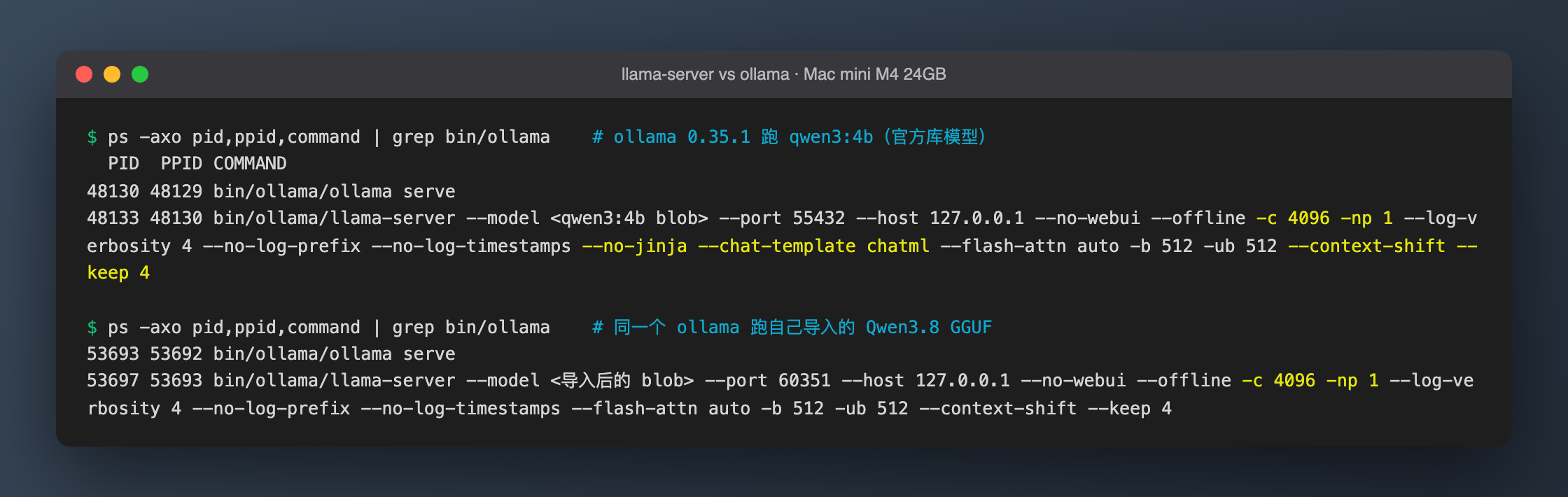 Figure: process list captured by the benchmark script while Ollama was running (paths shortened). Top: qwen3:4b from Ollama's library. Bottom: a Qwen3.8 GGUF I imported with
 ollama create. (Chinese comments: "Ollama 0.35.1 running qwen3:4b (library model)" / "the same Ollama running the imported Qwen3.8 GGUF".)
The unpacked Ollama directory contains a llama-server (--version reports 0.5.0-dev (build 1, commit 6f767fe96)) plus MLX files such as mlx_metal_v3/v4. When a GGUF model is loaded, ollama serve launches this llama-server as its runner with these key flags:
| Flag Ollama passes | Meaning |
|---|---|
-c 4096 -np 1 |
4096-token context, a single slot |
--no-jinja --chat-template chatml |
Ollama applies the template itself for library models (absent for imported GGUFs) |
--context-shift --keep 4 |
when generation fills the context, drop old tokens and keep going |
-b 512 -ub 512 |
logical batch 512; llama-server's default is -b 2048 -ub 512 |
--no-webui |
turn off llama-server's built-in web UI |
So the real question isn't "which engine is faster". It's which flags Ollama fills in for the same llama-server, and what management layer it wraps around it. Almost everything below confirms this.
Setup
- Versions: llama.cpp official release
b11376(2026-10-03, macos-arm64 prebuilt) and Ollama official releasev0.35.1(2026-09-29,ollama-darwin.tgz). Both ran from a temp directory; the brew-installed Ollama 0.19 on the machine was left alone. - Models, the same file on both sides:
- 4B: the GGUF blob behind Ollama's library
qwen3:4b(2.5GB, Q4_K_M, metadata name Qwen3 4B Thinking 2507). llama-server loads the blob directly with-m(hard-linked, no extra disk). - 27B: the
Qwen3.8-27B-UD-Q4_K_S.ggufalready on this machine (15.4GB). Ollama imports it withollama create; llama-server loads it directly.
- 4B: the GGUF blob behind Ollama's library
- Method (Python script, standard library only): each case starts one server, then measures cold start, sequential decoding (a writing prompt, max_tokens 300 / 200 for 27B, 5 / 3 runs), prefill (a ~2,500-token on-call log, 5 / 3 runs), needle-in-a-haystack (one line at the top says "the code word is 青鸟-7421", followed by filler, with the question at the end; ~15.7k tokens for 4B, ~7.6k for 27B), concurrency (4 requests at once for 4B, 2 for 27B), and memory (macOS
footprint). A random UUID prefixes every prompt to avoid prefix-cache hits.temperature 0. - How numbers are computed: decode speed = (completion_tokens − 1) ÷ (time of last streamed chunk − time of first chunk); prefill speed = prompt_tokens ÷ time to first token, measured client-side including HTTP overhead. Memory is footprint, which excludes the mmapped weight file and reflects extra memory such as KV cache and compute buffers; for Ollama it is serve + runner combined.
Experiments
1. Deployment: one command each, the difference is in defaults
# llama.cpp: unpack the release and run; it starts listening once the model is loaded
./llama-server -m Qwen3.8-27B-UD-Q4_K_S.gguf --host 127.0.0.1 --port 8080

# Ollama: start the server; the model loads on the first request
ollama serve                         # listens on 127.0.0.1:11434 by default
ollama create qwen38-ud -f Modelfile # the Modelfile is one line: FROM /path/to/Qwen3.8-27B-UD-Q4_K_S.gguf
Two observations:
-
Importing a GGUF into Ollama copies it.
ollama createtook 17.5 s and copied the 15GB file into Ollama's own model directory, so the model now takes up disk twice. After import,ollama showcorrectly listed thetoolsandthinkingcapabilities, so it read the template from the GGUF. -
The other direction doesn't always work. Loading the blob of Ollama's library
qwen3.5:27binto upstream llama-server fails immediately:error loading model hyperparameters: key qwen35.rope.dimension_sections has wrong array length; expected 4, got 3The
qwen3:4bblob loads fine. Ollama's bundled llama-server is not the same commit as upstream and their GGUF metadata conventions differ, so "reuse the model Ollama already downloaded in llama.cpp" won't always work.
Startup: with the model file already in the page cache, llama-server with the 4B and -c 4096 was ready in 0.6 s, and about 3 s with defaults (it first allocates 14GB of KV cache). Ollama's server answers in 0.2–0.6 s but loads the model on the first request, so the 4B's first token took 1.2–1.4 s. When the 27B's 15GB file wasn't cached, the first load took 14–16 s on either side. Also, a freshly downloaded binary is much slower on its first run (llama-server 17 s, Ollama 9.5 s; the second runs took 3.8 s and 0.3 s). That is presumably macOS checking new binaries on first launch, nothing to do with the engines, so drop the first run when measuring startup.
2. API: both OpenAI-compatible, with different details
Both serve /v1/chat/completions, so a client switches between them by changing the base URL. My script sent identical request bodies to both (stream: true + stream_options.include_usage), and both returned usage. Differences:
- llama-server names the model with
--alias, and requests use that name (min these runs). The final streamed chunk carriestimings(server-side prompt and generation speed), which is handy for benchmarking. - Ollama's
modelis a name from its model list (such asqwen3:4b), and the server loads the matching model by name. The OpenAI-compatible streaming response has notimings; for server-side timing use the native/api/chatendpoint. - Ollama unloads a model after 5 idle minutes by default (official FAQ:
By default models are kept in memory for 5 minutes), so the next request has to reload it. llama-server keeps the model in memory for as long as the process runs.
3. Speed: identical with the same flags
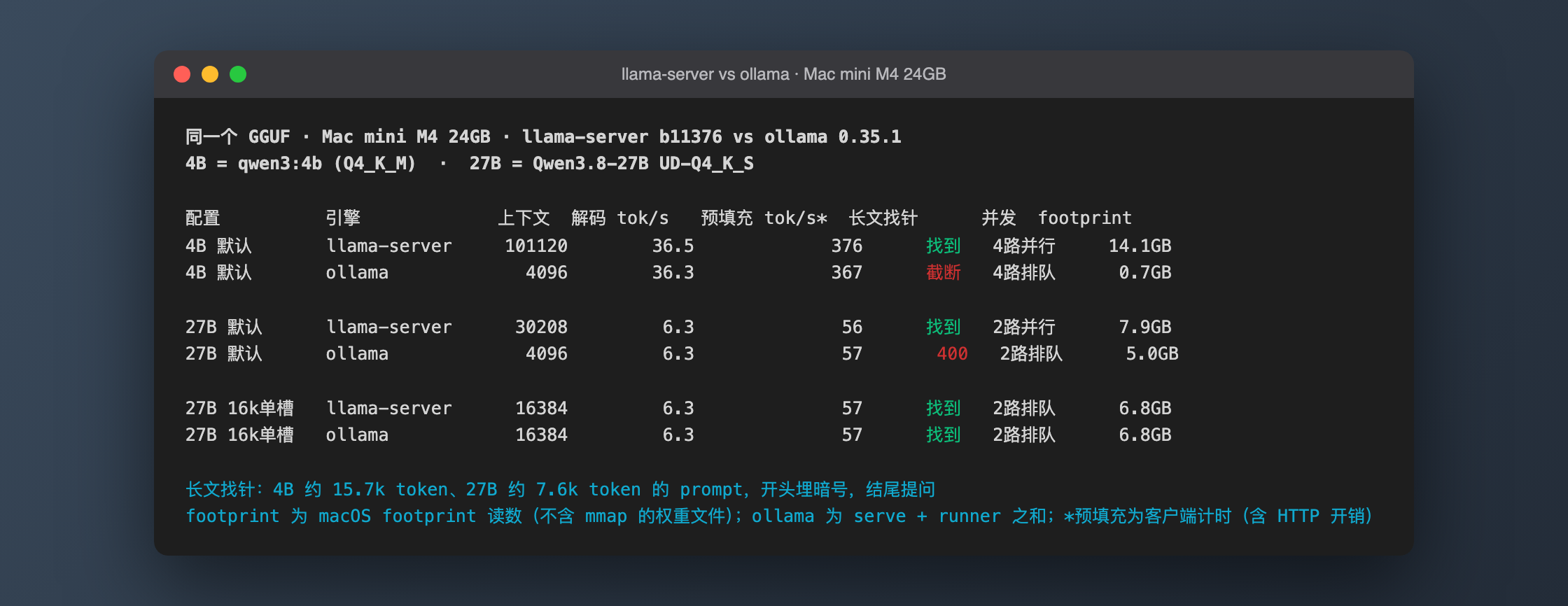 Figure: summary of all cases. Decode is the median of 5 / 3 runs. For the two 4B-default rows, the needle and memory columns come from the dedicated long-prompt cases (B1/B2). Column headers: config, engine, context, decode, prefill (client-timed), needle (找到 found / 截断 truncated / 400), concurrency (并行 parallel / 排队 queued), footprint.
| Model | Decode tok/s (llama-server / Ollama) | Prefill tok/s, client-timed |
|---|---|---|
| 4B, each with defaults | 36.5 / 36.3 | 376 / 367 |
| 27B, each with defaults | 6.3 / 6.3 | 56 / 57 |
| 27B, both at 16k, one slot | 6.3 / 6.3 | 57 / 57 |
The 27B's 6.3 tok/s matches the 6.0–6.5 tok/s plain autoregressive baseline this site measured earlier for Qwen3.8-27B. Ollama's 4B prefill is about 2% slower. When I ran llama-server with Ollama's -c 4096 -np 1, its own timings showed 384–389 tok/s, still slightly above Ollama. The remaining gap may come from the -b 512 Ollama passes (llama-server defaults to -b 2048); I didn't test that separately, so it's a guess. Either way the gap is at the noise floor: you won't regret either choice on speed.
4. Default context: 4096 versus "as large as memory allows"
This is by far the biggest difference.
- Ollama defaults to 4096. The official FAQ says
By default, Ollama uses a context window size of 4096 tokens, and the server log hasvram-based default context total_vram="17.8 GiB" default_num_ctx=4096, so the default is picked by VRAM tier and this machine lands in the 4096 tier. - llama-server defaults to
-c 0, the model's own context length, which the default-on--fitthen shrinks to fit memory. This 4B model declares 262,144;--fitbrought it down to 101,120, shared by 4 slots. The 27B came out at 30,208.
So the same ~15.7k-token prompt gets completely different treatment:
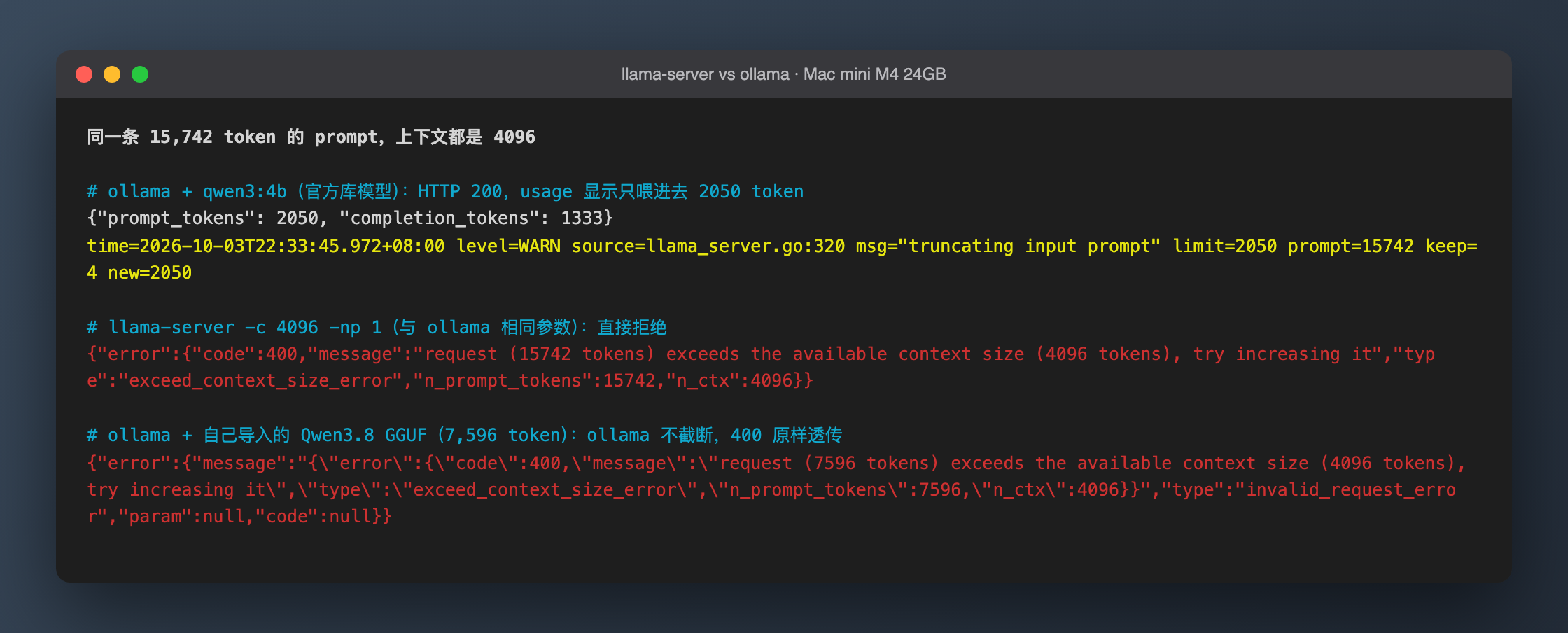 Figure: three ways of handling the same 4096 context. The yellow line is the only hint in Ollama's server log. (Chinese headings: "same 15,742-token prompt, context 4096 everywhere"; "Ollama + qwen3:4b (library model): HTTP 200, usage shows only 2050 tokens went in"; "llama-server -c 4096 -np 1 (same flags as Ollama): rejected outright"; "Ollama + imported Qwen3.8 GGUF (7,596 tokens): no truncation, the 400 is passed through".)
- Ollama + library model: HTTP 200 with
usage.prompt_tokensof just 2050. The code word at the top was cut off; the model produced 1,333 tokens without giving it. The server log has a single line,level=WARN msg="truncating input prompt" limit=2050 prompt=15742 keep=4 new=2050, and the API caller gets no signal at all. - llama-server with the same
-c 4096 -np 1: an immediate 400,request (15742 tokens) exceeds the available context size (4096 tokens), try increasing it. - Ollama + an imported GGUF (27B, 7,596 tokens): no truncation, and the 400 is passed through to the caller. The reason is in the flags table above: for library models Ollama applies the template itself (
--no-jinja --chat-template chatml) and also truncates at that layer; imported models are handed to llama-server as-is, so llama-server's error path applies.
Once the context is large enough, both find the needle: llama-server defaults, llama-server -c 32768, Ollama OLLAMA_CONTEXT_LENGTH=32768, and both sides at 16k for the 27B all answered 青鸟-7421 correctly.
On the same Ollama, changing where the model came from flips over-long prompts from "silently truncated" to "error". For RAG, codebase Q&A or long-document summaries on Ollama, the silent case is the dangerous one: the answer looks normal, but the model only saw half the input.
5. Concurrency: 4 parallel slots by default vs a queue by default
Four writing requests at once (4B, 200 tokens each):
| First token per request (s) | Decode per request, tok/s | Total throughput, tok/s | |
|---|---|---|---|
| llama-server defaults (4 slots) | 2.36 / 2.37 / 2.37 / 2.37 | 11.6 | 40.9 |
| Ollama defaults (1 slot) | 0.27 / 6.0 / 11.7 / 17.4 | 36.3 | 34.9 |
llama-server -c 32768 (4 slots sharing it) |
1.02 × 4 | 11.6 | 44.0 |
Ollama OLLAMA_CONTEXT_LENGTH=32768 + OLLAMA_NUM_PARALLEL=4 |
7.53 × 4 | 11.8 | 32.7 |
On the 4B, llama-server's parallel slots buy about 17% more total throughput, at the cost of every request running at a third of the speed. Ollama queues by default, so the fourth request waits 17 s for its first token. On the 27B, parallelism pays off even less: 6.86 vs 5.9 tok/s total for 2 requests, with each dropping to 3.8 tok/s.
If you're one person sending one request at a time, queueing actually gives each request the best speed; parallel slots only matter when several agents or people share the server.
6. Memory: the same "32k + 4 parallel" setting differs 3x
| Config (4B) | Flags actually passed to llama-server | footprint |
|---|---|---|
| Ollama defaults | -c 4096 -np 1 |
0.7 GB |
Ollama OLLAMA_CONTEXT_LENGTH=32768 |
-c 32768 -np 1 |
4.7 GB |
Ollama 32k + OLLAMA_NUM_PARALLEL=4 |
-c 131072 -np 4 |
21.0 GB |
llama-server -c 32768 (4 slots, auto) |
-c 32768, kv_unified = 'true' |
6.9 GB |
| llama-server defaults | -c 0 → fit to 101120, 4 slots |
14.1 GB (after the long-prompt case only) / 18.3 GB (after the full suite) |
Two traps:
- Ollama's
OLLAMA_CONTEXT_LENGTHis per request slot, multiplied by the number of parallel slots (official FAQ:Required RAM will scale by OLLAMA_NUM_PARALLEL * OLLAMA_CONTEXT_LENGTH). llama-server's-cis the total, shared across slots with a unified KV cache (kv_unified). The same "32k, 4 parallel" means 32k for each request on Ollama and 32k for all four together on llama-server. Different semantics, 3x the memory. - llama-server's defaults take most of a 24GB machine's memory, even for a 2.5GB model. Two reasons:
--fitgrows the KV cache until it nearly reaches the memory limit (default margin just 1024 MiB), and the default--cache-ram 8192keeps up to 8GB of old prompt state in RAM, growing as more requests come in. The same default config measured 14.1GB after the long-prompt case and 18.3GB after the full suite.
For the 27B: llama-server defaults (30,208 context) 7.9GB, Ollama defaults 5.0GB, and 6.8GB on both at 16k. Qwen3.8 uses hybrid attention with only 1 full-attention layer in every 4, so its KV cache is much smaller than a full-attention model like the 4B, and the 27B's extra memory ends up lower than the 4B's defaults.
One counterexample: Ollama's library qwen3.5:27b (/api/ps reports 17.2GB, and the runner also loads a vision module via --mmproj) shows size_vram of 15.6GB on this machine, meaning about 1.6GB sits on the CPU (decimal GB from /api/ps byte counts). It decoded at 5.8 tok/s with a 21.1GB footprint. A 17GB-class model is at the edge of what a 24GB machine can hold; the 27B UD-Q4_K_S (15.4GB) fits entirely on the GPU.
7. Built-in web UI: llama-server has one, Ollama turns it off
llama-server ships with a web UI enabled by default. Open http://127.0.0.1:8080 in a browser to chat, with token counts and speed shown:
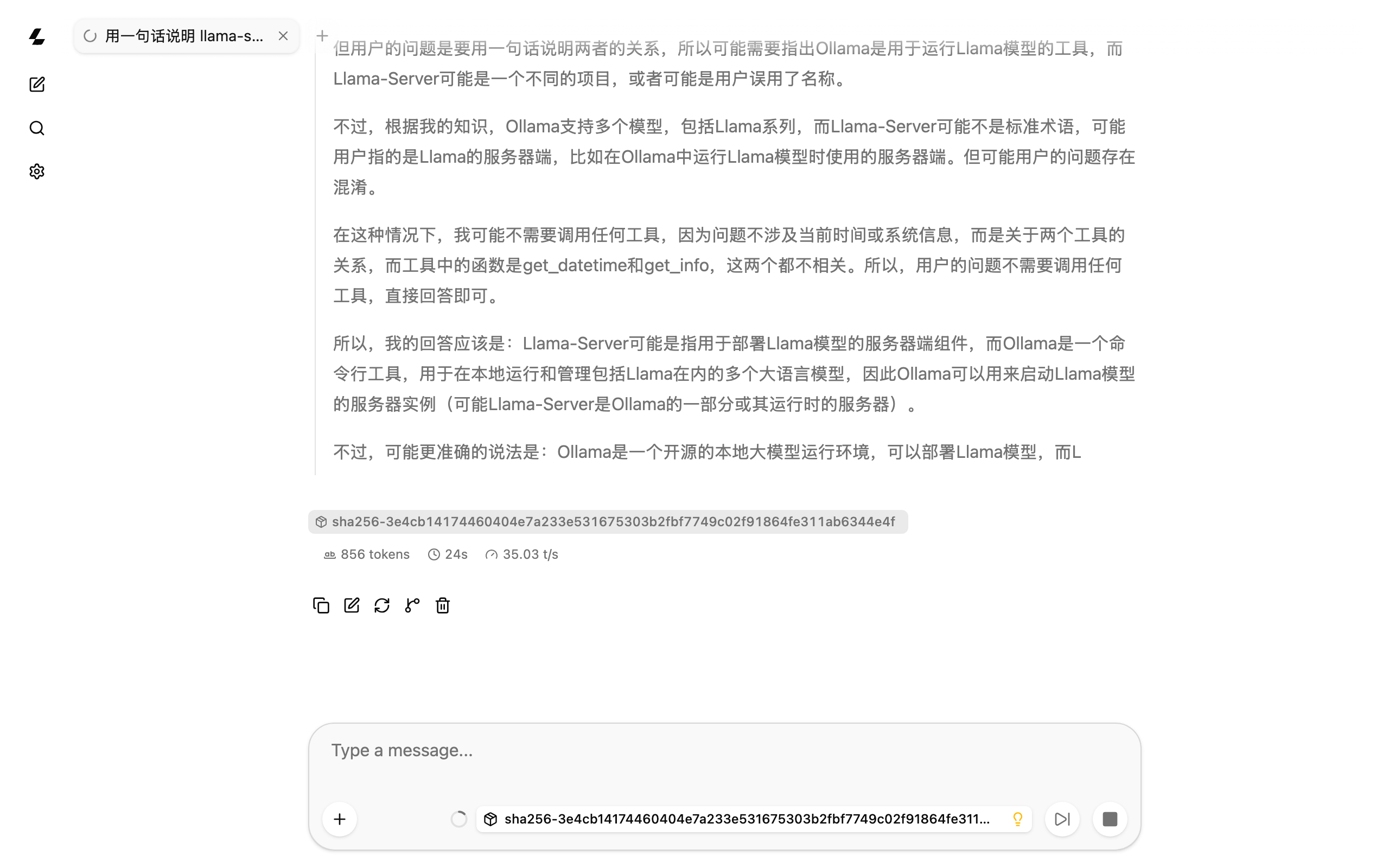 Figure: llama-server b11376's built-in web UI with the 4B (
-c 8192 -np 1). The screenshot stops mid-reasoning; this 4B model gets the llama-server/Ollama relationship wrong while thinking, so treat it as a UI demo only. The prompt asks, in Chinese, for a one-sentence explanation of how llama-server and Ollama relate.
Ollama explicitly passes --no-webui when it starts the runner, so the command-line version has no web UI (the macOS desktop app has its own chat window, which I didn't test). For a web front end on Ollama you'd add something like Open WebUI.
Results
Which one to pick
| Your situation | Pick |
|---|---|
| Want it to just work, pull models from the library, switch models often | Ollama, but raise OLLAMA_CONTEXT_LENGTH first |
| Manage your own GGUF files, want exact control over context / concurrency / memory, or want a built-in web UI | llama-server |
| Backend for Claude Code-style tools, RAG, long-document summaries | Either works if you set the context explicitly; watch out for silent truncation with Ollama library models |
| Several agents or people calling it at once | llama-server has parallel slots by default; on Ollama set OLLAMA_NUM_PARALLEL and budget memory as per-slot length × slots |
Recommended flags on a 24GB Mac
# llama-server: set context and slots explicitly so --fit and the prompt cache don't eat your memory
./llama-server -m model.gguf -c 16384 -np 1 --cache-ram 2048 \
  --host 127.0.0.1 --port 8080

# Ollama: set the server-wide default context (when started from the command line)
OLLAMA_CONTEXT_LENGTH=16384 ollama serve
With the 27B at -c 16384 -np 1, both sides showed a 6.8GB footprint. Add roughly 14.3GB of mapped weights (the 15.4GB file) and the total is close to 21GB. That doesn't leave much room on a 24GB machine, so close memory-hungry apps first.
I didn't test --cache-ram 2048 separately; it's a conservative value based on "the 8GB default is too much for 24GB". 0 disables the prompt cache entirely (official help: 0 - disable). The Ollama desktop app doesn't go through your shell, so per the official FAQ set environment variables with launchctl setenv and restart the app. A single request can also override the context with options.num_ctx on the native API (as shown in the official FAQ).
Security notes
- llama-server prints
security: no API key is set and CORS allows all originsat startup. That's fine while it only listens on 127.0.0.1; if you switch to--host 0.0.0.0to expose it on your LAN, add--api-key. - Ollama binds 127.0.0.1:11434 by default (official FAQ). After setting
OLLAMA_HOST=0.0.0.0as many tutorials suggest, anyone on the LAN can call it, since it has no authentication of its own.
Gotchas
- Ollama's silent truncation only happens with library models. On the same Ollama, an imported GGUF returns 400 when the prompt is too long, while a library model returns 200 with half the prompt. When a model "didn't see" earlier content, check
usage.prompt_tokensfirst, then look fortruncating input promptin Ollama's server log. OLLAMA_NUM_PARALLELmultiplies memory by the slot count. 32k with 4 slots on the 4B is 21GB; with a 27B, a 24GB machine can't possibly hold it.- llama-server's defaults fill your memory. 14.1–18.3GB footprint for a 4B model. On a Mac you also use for other things, set
-cand--cache-ramexplicitly. - Ollama blobs aren't guaranteed to work with upstream llama.cpp.
qwen3.5:27bfailed with arope.dimension_sectionslength mismatch. To share a file between the two, import an upstream GGUF into Ollama. - This qwen3:4b is the Thinking variant, and
/no_thinkdoes nothing. My first long-prompt run allowed only 32 output tokens, all spent on reasoning, so neither side answered and it almost looked like both had truncated. Raising it to 2048 showed what really happened. - Mistakes in the experiment itself: in one case llama-server returned 400 on the long prompt, the benchmark script didn't catch the exception and exited, and the llama-server it left behind became an orphan holding port 8080 and over ten GB of memory. The next Ollama case ran with that memory taken, and the readiness check of the case after that connected straight to the orphan. All three cases were discarded (raw records kept); the script now cleans up in try/finally and checks the port before starting, and the cases were rerun. Also, footprint excludes mmapped weights and llama-server's prompt cache grows as the tests proceed, so memory has to be compared at the same stage; the tables above say which stage.
Related reading
- How Large a Local LLM Can a 24GB Mac mini Run? A Summary of Memory Budgets, Measured Speeds, and Acceleration Methods
- Qwen3.8 Native MTP on a 24GB Mac mini: 3GB Less Memory, 24% Slower — Head-to-Head With DFlash 2
- Same 24GB Mac mini, Same DFlash 2: 1.9x Faster on MLX, 50% Slower (and OOM) on llama.cpp
- LLM VRAM Calculator