Claude Code install errors, reproduced: EACCES, a 600s mirror stall, Node 20 silently getting an old version, a region-block install.sh, and the native installer removing your npm copy
People searching "claude code install" rarely lack a tutorial. What they lack is an explanation of the error they just hit. The install steps are already covered in the Claude Code quickstart, so this article skips them. Instead I reproduced every install failure I could on a real machine and recorded the verbatim error, trigger, wall time and exit code for each, followed by the fix.
The three that surprised me most:
- Node 20 does not fail. It silently installs 2.1.197. Starting with 2.1.198 the package requires
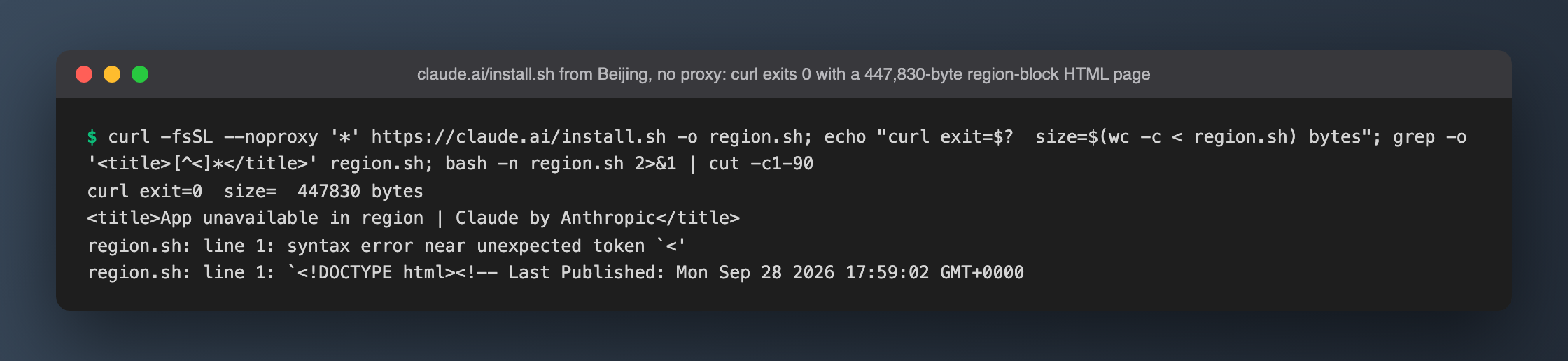
node >=22, so npm quietly picks the newest version whose engines still match, with no warning at all. curl -fsSL https://claude.ai/install.shfrom a blocked region exits 0 and saves a 447,830-byte "App unavailable in region" HTML page. Pipe it intobashand all you see issyntax error near unexpected token '<'.- The native installer runs
npm uninstall -g @anthropic-ai/claude-codeand prints nothing about it. During this test it really did remove the global install on my machine; the full story is in "Gotchas" below.
Background
Claude Code currently has two official install paths:
- npm:
npm install -g @anthropic-ai/claude-code. The package is now just a shell. The real program comes from a per-platform optionalDependency (for example@anthropic-ai/claude-code-darwin-arm64, a 98,952,459-byte tarball), and the postinstall scriptinstall.cjshard-links that native binary tobin/claude.exe. Theclaudecommand is no longer JavaScript. It is a Mach-O executable (226,563,088 bytes for 2.1.284). - Native installer:
curl -fsSL https://claude.ai/install.sh | bash. The script downloads a binary fromdownloads.claude.ai, verifies its sha256, runsclaude install, and ends up at~/.local/bin/claude.
Each path fails in its own ways. On a network in mainland China, several of those errors look entirely unrelated to their real cause.
Analysis
Here is where a Claude Code install can break:
| Stage | What goes wrong | Rows below |
|---|---|---|
| Writing the global prefix | No write permission | #1 |
| npm cache | Cache not writable | #2 |
| Registry | Unreachable, DNS fails, slow mirror | #3 #4 #6 |
| Proxy | npmrc and env vars disagree | #5 |
| Node version | engines gate | #7 #8 |
| Native installer | Region block, download host unreachable, replaces the npm copy | #9 #10 #12 |
| After install | PATH, postinstall skipped, wrong way to launch | #11 #13 #14 #15 |
One easily missed detail: npm install -g ignores the project's .npmrc. In this repo, whose .npmrc points at npmmirror, with HOME isolated:
$ npm config get registry        → https://registry.npmmirror.com/
$ npm config get registry -g     → https://registry.npmjs.org/
Global installs read only ~/.npmrc, the global/builtin npmrc and CLI flags. When debugging registry or proxy problems, always check with npm config get <key> -g.
Approach
The goal was real reproductions without damaging the machine:
- Every install isolated:
--prefix,--cacheand--logs-dirall pointed under/tmp/cc-install-0929/, and nothing touched~/.npmor/opt/homebrew. The native-installer run was the one exception; see "Gotchas". - Failures triggered with controlled bad values: registry at
127.0.0.1:1and a.invaliddomain, proxy at127.0.0.1:1/:2, a 0555 cache dir, and/usr/localfor permissions. - Old Node from a portable tarball: the machine's Node 22 / 24 / 25 all satisfy
>=22, so I unpacked Node v20.19.5 (npm 10.8.2) under/tmp. No nvm, no system changes. - Network comparison: mirror and npmjs runs used separate caches. With a shared cache, the second run would hit the same integrity entry and measure nothing.
Excluded:
- Windows / Linux: I only have macOS, and I won't quote error text I haven't seen.
sudo npm install -g: it writes system directories and is the most common bad advice online. Not worth damaging the machine for.- pnpm / yarn / bun: the error text mentions "some pnpm configs", but I didn't reproduce that, so I draw no conclusions.
- No API calls: install problems have nothing to do with the model. Zero API calls, $0 spent.
Test setup
- macOS 26.3.1, Apple Silicon; Node v25.9.0, npm 11.11.0; Beijing, direct connection (egress AS4847), no system proxy, no TUN.
- Pre-existing Claude Code 2.1.280 (Homebrew npm global). npm dist-tags at test time: latest 2.1.284, stable 2.1.277, so an unpinned install gets 2.1.284.
- Each run logged the verbatim command, stdout+stderr, wall seconds and exit code. Colored output was saved as
.ansi, and the screenshots are rendered from those files, not typed by hand. - Time: 2026-09-29, 10:02–10:37 (UTC+8).
Results: 15 errors, verbatim
"Fix verified" ✅ means I confirmed the fix on this machine. "Not verified" means the advice comes from the error text or docs.
| # | Error text (excerpt) | Trigger | Wall | exit | Fix | Fix verified |
|---|---|---|---|---|---|---|
| 1 | npm error code EACCES … Error: EACCES: permission denied, mkdir '/usr/local/lib' |
Global prefix not writable | 0.12s | 243 | Don't sudo. Move the prefix to a user-writable dir (npm config set prefix ~/.npm-global, add ~/.npm-global/bin to PATH), or use Node from Homebrew / nvm |
✅ (every --prefix /tmp/... install succeeded) |
| 2 | Your cache folder contains root-owned files, due to a bug in previous versions of npm … sudo chown -R 501:20 "…" |
Cache not writable. Here it was owned by me, just mode 0555 | 1.45s | 1 | First ls -ld "$(npm config get cache)" to see whether it's ownership or mode bits; chown only if it really is root-owned |
Not verified (error only) |
| 3 | FetchError: request to http://127.0.0.1:1/… failed, reason: connect ECONNREFUSED 127.0.0.1:1 |
Registry port closed | 3.16s (short retries) / 70.15s (defaults) | 1 | Find who set it with npm config get registry -g and fix it |
✅ |
| 4 | network request to https://nonexistent-cc-0929.invalid/… failed, reason: getaddrinfo ENOTFOUND |
Registry host doesn't resolve | 3.86s | 1 | Same as #3 | ✅ |
| 5 | request to https://registry.npmjs.org/… failed, reason: connect ECONNREFUSED 127.0.0.1:2 |
A leftover proxy=/https-proxy= in npmrc overrides env HTTPS_PROXY |
0.13s | 1 | Check both npm config get proxy -g and npm config get https-proxy -g and remove the leftover |
✅ (empty userconfig → env honored again) |
| 6 | No error, just stuck: done in 147.22s / killed after >600s | Platform package downloaded through npmmirror, on this network | 147s / >600s | 0 / killed | Compare once with --registry https://registry.npmjs.org |
✅ npmjs here: 10.74s / 12.20s (2 samples each) |
| 7 | No error: added 2 packages in 21s, then claude --version → 2.1.197 |
Node <22, version not pinned | 21s | 0 | Use Node ≥22; check claude --version after installing |
✅ (Node 25 gets 2.1.284) |
| 8 | npm warn EBADENGINE Unsupported engine / with --engine-strict: npm error code EBADENGINE |
Node <22, pinned @2.1.284 |
5.51s / 0.17s | 0 / 1 | Same as #7 | ✅ |
| 9 | bash: line 1: syntax error near unexpected token '<' (the HTML has <title>App unavailable in region</title>) |
Direct fetch of claude.ai/install.sh from mainland China |
6.27s / 3.00s (two runs) | curl 0 | Save to a file with -o install.sh and head -1 it first; use npm instead, or go through a proxy |
✅ (via proxy: the real 9,704-byte script) |
| 10 | curl: (28) Failed to connect to downloads.claude.ai port 443 after 75595 ms |
Direct connection to the download host | 75.63s | 28 | Use a proxy | ✅ (installed in 51.74s) |
| 11 | Native installation exists but ~/.local/bin is not in your PATH |
After a native install | 51.74s | 0 | Add ~/.local/bin to PATH as suggested; the installer does not edit ~/.zshrc for you |
✅ |
| 12 | No output at all, while npm uninstall -g @anthropic-ai/claude-code runs in the background |
Running the native installer after an npm global install | 28.76s (whole installer) | 0 | If you want to keep the npm copy, don't run the native installer. If you already did, run which -a claude to see which copy you're using |
✅ (fake npm + strings, see below) |
| 13 | zsh:1: command not found: claude |
$(npm prefix -g)/bin or ~/.local/bin missing from PATH |
0.11s | 127 | Add the right bin dir to PATH | ✅ |
| 14 | Error: claude native binary not installed. … node node_modules/@anthropic-ai/claude-code/install.cjs |
Installed with --ignore-scripts, so postinstall never ran |
0.84s | npm 0, claude 1 | Reinstall without --ignore-scripts, or run node "$(npm root -g)/@anthropic-ai/claude-code/install.cjs" by hand |
Not verified |
| 15 | TypeError [ERR_UNKNOWN_FILE_EXTENSION]: Unknown file extension ".exe" |
Old tutorials' node …/bin/claude --version |
— | 1 | Execute …/bin/claude --version directly |
✅ |
The rows that need more explanation follow.
#1 #2: permission errors, and a wrong diagnosis
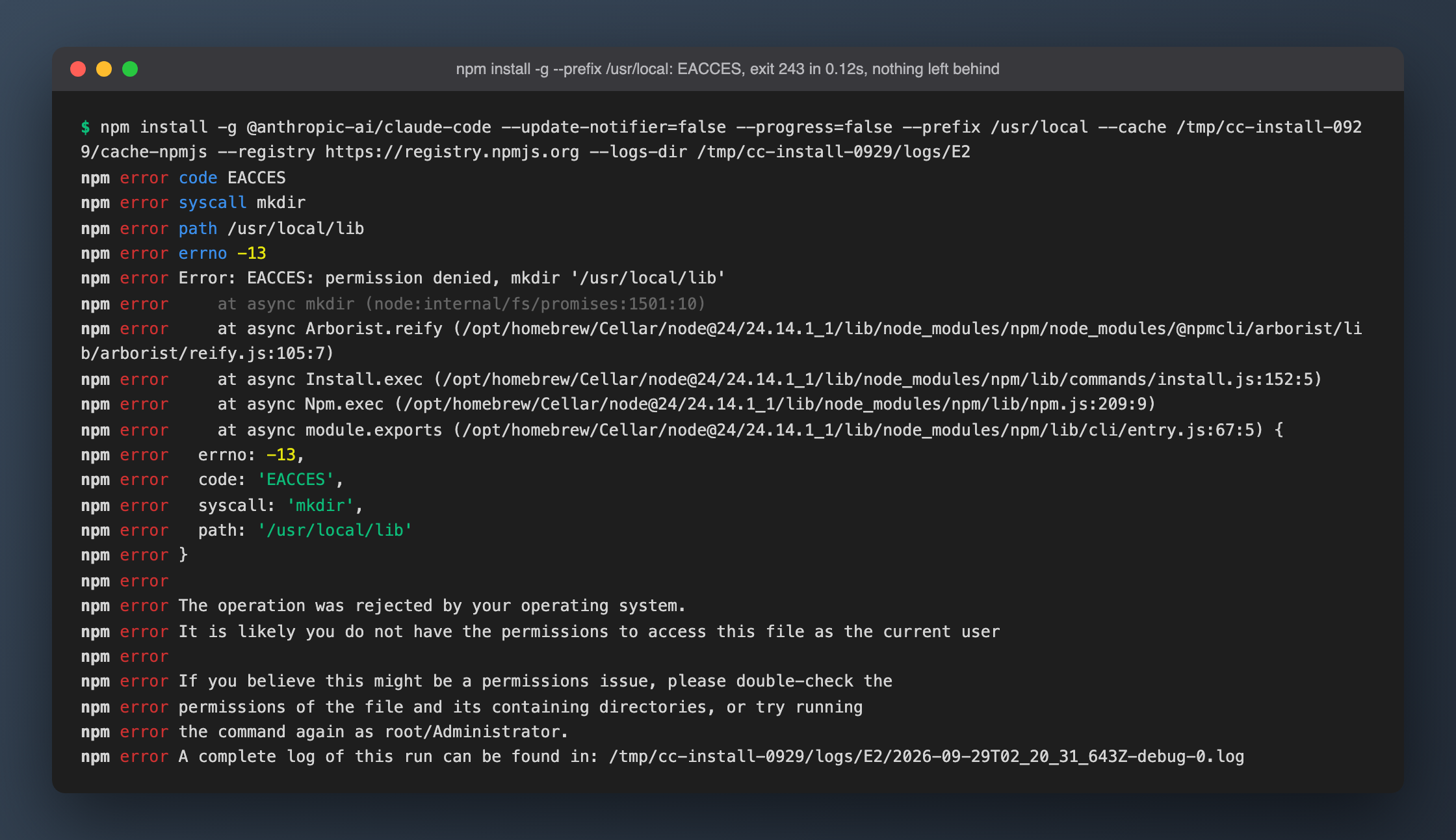
--prefix /usr/local is the textbook EACCES: it fails in 0.12s with exit 243 because mkdir '/usr/local/lib' is denied right away. That also means no half-installed leftovers: /usr/local matched its baseline afterwards.
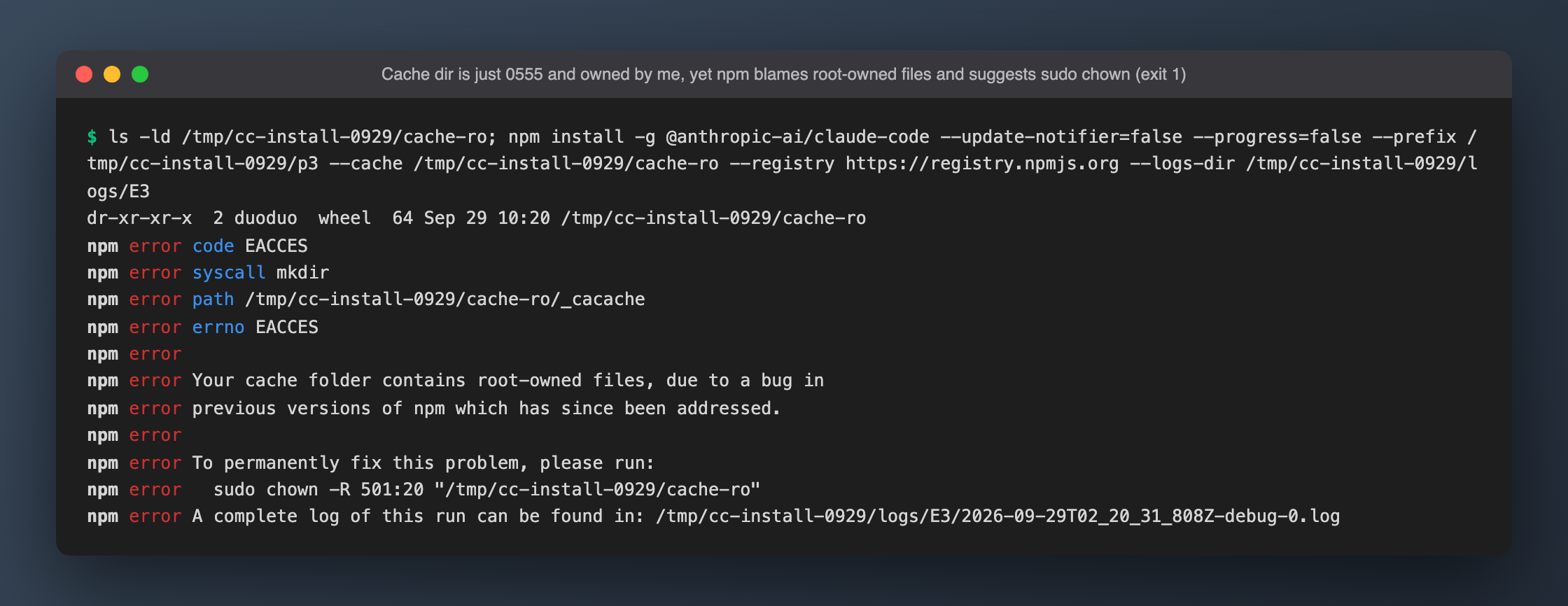
The cache error is the more interesting one. I made the cache dir mode 0555, still owned by me (duoduo), yet npm said "Your cache folder contains root-owned files, due to a bug in previous versions of npm" and suggested sudo chown -R 501:20. That won't fix it, because ownership was never the problem. Run ls -ld before touching anything.
#3 #4 #5: when the registry is unreachable, npm waits 70 seconds by default
npm defaults to fetch-retries=2 with a 10s → 60s backoff. With the registry port refused (ECONNREFUSED), the default settings take 70.15s over 3 attempts before failing; with shortened retries it's 3.16s. DNS failures (ENOTFOUND) also get 3 attempts. An install that looks stuck may simply be retrying.
Proxy precedence, five combinations:
| Env var | Isolated npmrc | npm actually connected to |
|---|---|---|
HTTPS_PROXY=:1 |
empty | :1 |
HTTPS_PROXY=:1 |
https-proxy=:2 |
:2 |
HTTPS_PROXY=:1 |
proxy=:2 |
:2 |
| none | proxy=:2 |
:2 (proxy= applies to https registries too) |
lowercase https_proxy=:1 |
empty | :1 |
Takeaway: proxy settings in npmrc beat environment variables, even a bare proxy=. The error message shows the registry URL with the proxy's port and never mentions a proxy, so it's easy to think the registry itself is down. Also note that npm's proxy handling is separate from Node's built-in fetch, which ignores HTTPS_PROXY; see this article.
#6: mirror vs. official registry (only 2 samples)
| Run | Registry | Wall | exit |
|---|---|---|---|
| Mirror #1 | npmmirror (via ~/.npmrc) |
147.22s | 0 |
| Mirror #2 | npmmirror | >600s, killed | — |
| npmjs #1 | registry.npmjs.org, direct | 10.74s | 0 |
| npmjs #2 | registry.npmjs.org, direct | 12.20s | 0 |
npm's debug log puts the mirror's slowness on the 99 MB platform tarball from cdn.npmmirror.com: 139,231 ms, versus 6,881 ms / 7,619 ms for the same package from npmjs. Fetching the mirror file directly with curl failed after 125.7s with exit 35 (SSL connect error); npmjs took 7.66s at 12.9 MB/s.
Scope matters here: these are 2 samples per side, taken on the morning of 2026-09-29 from Beijing on AS4847. They don't show that the mirror is always slower. They do show that "use the mirror in China" isn't unconditionally true, and a comparison run with --registry https://registry.npmjs.org costs about ten seconds. The killed run also left a half-built prefix containing only lib/.
#7 #8: Node 20 doesn't error, it installs an old version
This was the sneakiest one. Checking engines for every published version: up to 2.1.197 it's >=18.0.0; from 2.1.198 on it's >=22.0.0. Under Node v20.19.5:
- Unpinned:
added 2 packages in 21s, exit 0, installs 2.1.197, no warning at all. - Unpinned +
--engine-strict: still 2.1.197, still no warning. - Pinned
@2.1.284: onlynpm warn EBADENGINE, exit 0, and the binary still runs, because it's native and doesn't depend on Node. - Pinned
@2.1.284+--engine-strict:npm error code EBADENGINE, exit 1, 0.17s, leaving an emptylib/.
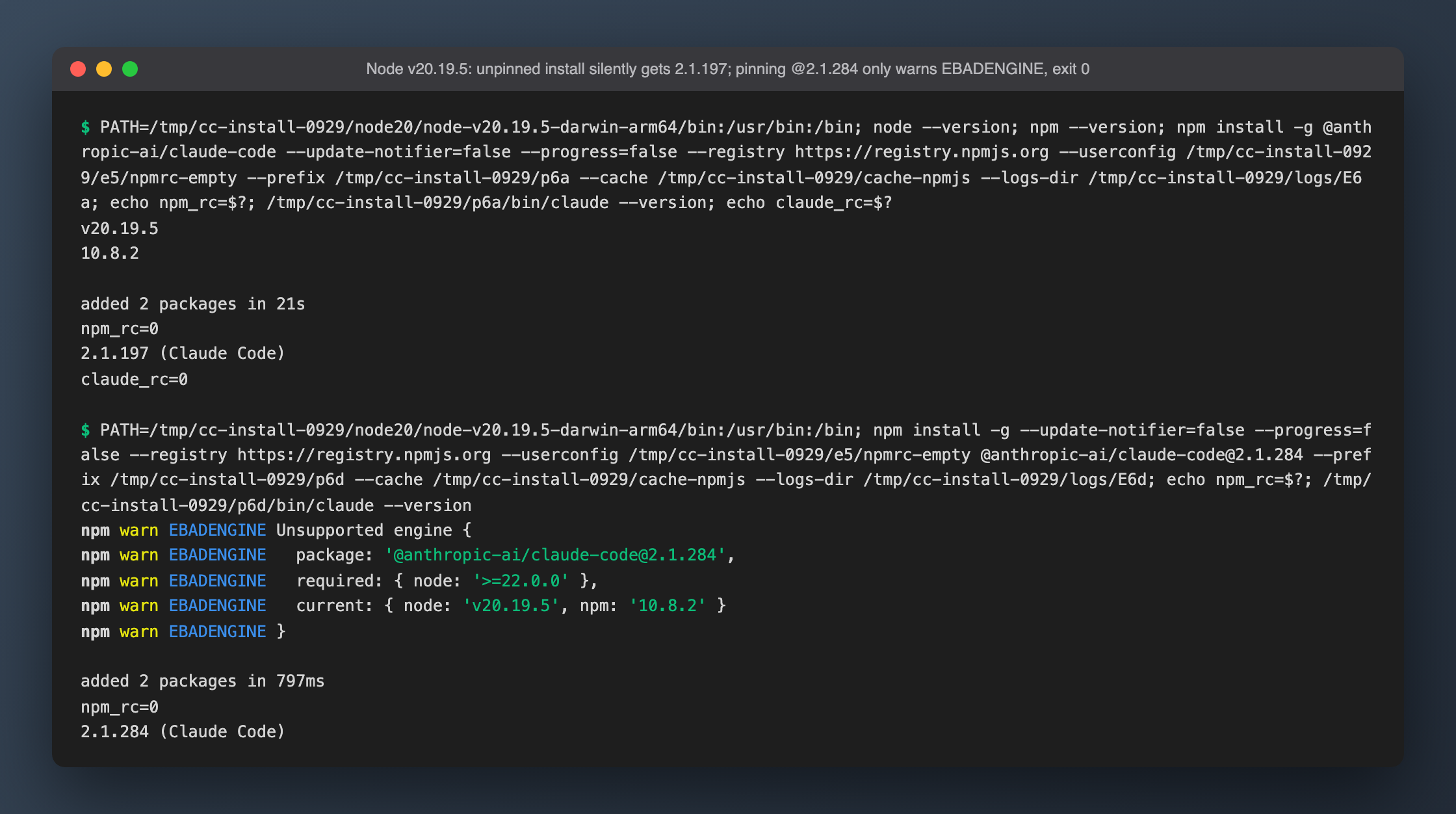
If you're on Node 18/20 and features from the docs seem to be missing, check claude --version first.
#9 #10 #11 #12: four traps in the native installer
A region-block page treated as a script. From mainland China, claude.ai/install.sh returns a 302 to claude.com/app-unavailable-in-region and then 200 text/html. The -f in curl -fsSL only reacts to HTTP error codes, so curl exits 0. Runs at 10:19 and 10:37 gave the same 447,830 bytes.
Download host unreachable. With the real script (fetched via proxy) run on a direct connection, the first request to downloads.claude.ai/claude-code-releases/latest fails with curl (28) after 75,595 ms. The script does contain a friendly message (not available in your region), but because of set -e plus command substitution it exits with curl's 28 before that message can print.
It works through a proxy, but PATH is on you. Installed 2.1.284 in 51.74s as ~/.local/bin/claude → ~/.local/share/claude/versions/2.1.284 (about 216 MB). The installer warns ~/.local/bin is not in your PATH and shows an echo … >> ~/.zshrc line, but doesn't run it.
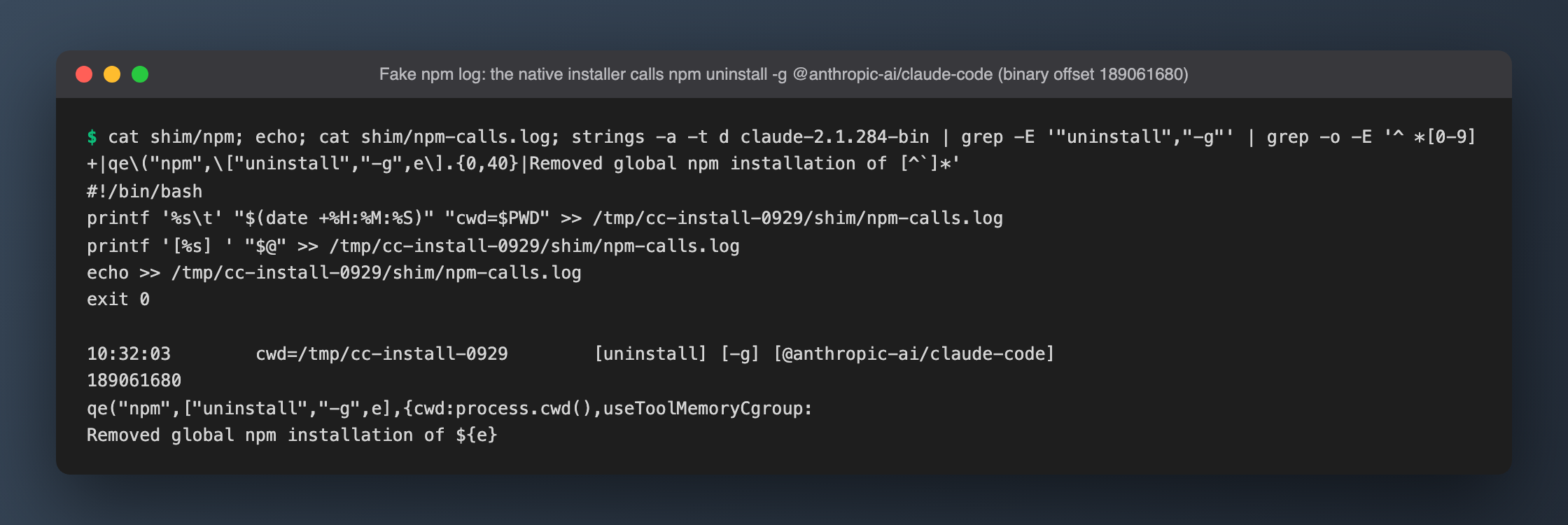
It uninstalls your npm copy. The native binary's install subcommand looks for an npm global install and, if it finds one, runs npm uninstall -g @anthropic-ai/claude-code. I confirmed this two independent ways:
- Fake npm: I put an
npmfirst on PATH that only logs its arguments and exits 0, setnpm_config_prefixto an isolated dir as a second safeguard, and ranclaude install. It logged exactly one call:[uninstall] [-g] [@anthropic-ai/claude-code]. - strings: at offset 189061680 of the 2.1.284 binary:
qe("npm",["uninstall","-g",e],{cwd:process.cwd(),…}), followed on success byt(\Removed global npm installation of ${e}`)`. That is a log call, not terminal output, which is why nothing appears on screen.
The installer's terminal output is only Checking installation status… / Installing… / ✔ Claude Code successfully installed!. From the product's side this is presumably an intentional migration. But if anything depends on the npm copy (say, a script with /opt/homebrew/bin/claude hardcoded), it breaks silently.
#14 #15: installed but won't run
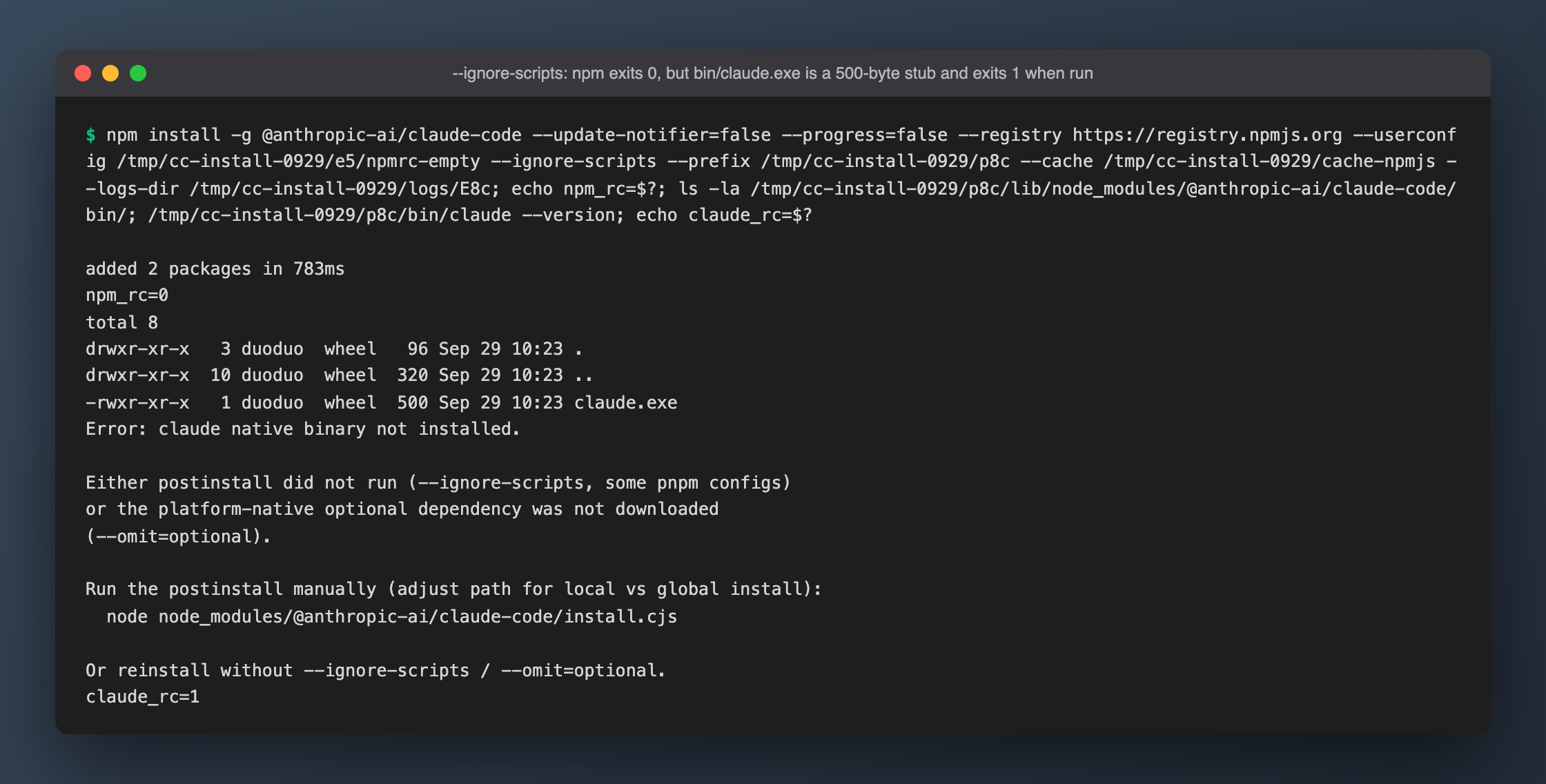
With --ignore-scripts, npm exits 0 and everything looks fine (the whole install + run group took 0.84s). But bin/claude.exe is a 500-byte placeholder, and running it gives Error: claude native binary not installed., exit 1. To its credit, the message names the exact command to run the postinstall by hand.
Old tutorials' node $(npm root -g)/@anthropic-ai/claude-code/…/claude pattern no longer works: node …/bin/claude --version fails with ERR_UNKNOWN_FILE_EXTENSION ".exe" because the file is a Mach-O binary. Execute it directly.
If it installs and runs but login fails with Invalid API key / Not logged in, that's an auth problem, not an install problem; see Claude Code auth errors, tested.
Not reproduced / not applicable
--omit=optionalnot reproduced: the error text says it can leave the binary missing, but with npm 11.11.0 global installs the platform package was installed anyway andclaude --versionworked.- "Breaks after switching Node versions" doesn't apply: the artifact is a native binary, and
otool -Lshows only system libraries. It ran under Node 20 / 22 / 25, and so didcli-wrapper.cjs. There is no ABI issue in current versions. - Reinstalling the same version: npm reports
changed 2 packages(4.80s, then 0.87s), not "up to date".
Gotchas
Isolating HOME does not stop global npm writes. For the native-installer run I pointed HOME at /tmp and assumed that was enough isolation. It wasn't. The installer's npm uninstall -g used the global prefix from npm's builtin config (/opt/homebrew), which has nothing to do with HOME. My real 2.1.280 global install was removed, and claude became command not found. Restoring it with npm install -g @anthropic-ai/claude-code@2.1.280 --registry https://registry.npmjs.org took about 3 seconds. That's why row #12 has three pieces of evidence: the npm debug log from the accident (argv "uninstall" "--global" "@anthropic-ai/claude-code"), plus the safe fake-npm and strings reproductions afterwards. Before running someone else's installer, set npm_config_prefix to an isolated dir, or take npm off PATH.
curl -f doesn't catch region-block pages. -f looks only at the status code, so it happily accepts a 200 HTML page reached through a 302. Save the file and look at it before curl … | bash.
Spaces in PATH. My first attempt at reproducing #12 used env PATH=$T/shim:$PATH …, which broke on a PATH entry with a space in it (VMware Fusion.app) and exited 127. Luckily the installer never ran. Quote PATH when building it.
Passing a title that starts with --ignore-scripts to npm run. When rendering screenshots with npm run term-shot … "--ignore-scripts: …", npm treated the title as its own flag and swallowed it, so both images came out with the default title. Use npm run term-shot -- ….