Play with the Digital Fruit Fly
All three interactives below compute real physics live in your browser (MuJoCo compiled to WebAssembly) — they are not animations. Click Launch, click inside the view, then use your keyboard.
Drive a fruit fly through a slalom
Three levels, three layers of neural control: in Level 1 a central pattern generator (CPG) coordinates all six legs for you; Level 2 hands you the two tripods; Level 3 gives you one key per leg — and you'll quickly see why a fly never has to 'think' about walking.
1/2/3 switch level · Level 1: W/A/S/D steer, Q stop · Level 2: G/H step left/right tripod, F/J step back · Space restarts · gamepad supported
Flight sandbox: wings beating 200+ times a second
The wings follow a real fruit-fly stroke pattern, lift comes from MuJoCo's fluid model, and a stabilizing controller only nudges tiny left/right wing asymmetries. You give intent; let go and it hovers. It's real physics in your browser, so it runs at a fixed 0.2× slow motion.
W/S forward/back · A/D turn · Space climb · Shift descend · R reset (on-screen labels are in Chinese)
3D bench: move every joint of the fly
The full NeuroMechFly body model: drag sliders to drive each joint and toggle contact forces, joint axes and actuator forces to see how an insect leg is put together.
Drag to orbit · scroll to zoom · use the sliders in the side panel
Behavior driven by the whole-brain model
139k neurons don't run in a browser yet, so these are recordings we computed on a Mac mini with the FlyWire whole-brain LIF model plus the physics body. Each caption says what the clip actually shows.
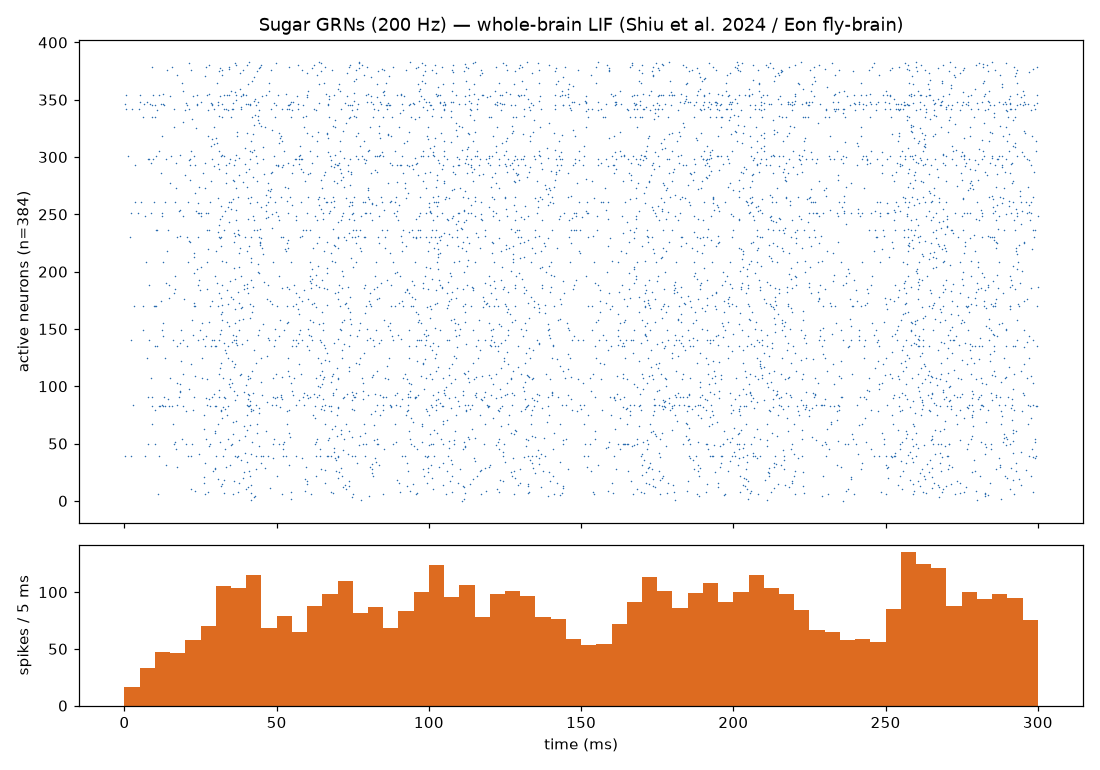
What the whole brain does when the fly tastes sugar
Stimulating sugar-taste neurons at 200 Hz for 0.3 s recruits 384 neurons across the brain, which fire 5,125 spikes in total. Each row is a neuron, each dot a spike.
FAQ
Why does the fly move so slowly?
Because the physics is real. Walking steps at 0.1 ms and flight at 0.05 ms, so even at full speed a browser manages only a fraction of real time. Playback is fixed (≈0.1× walking, 0.2× flight) so it feels the same on every machine; the achieved factor is shown top-right.
Does it work on a phone?
All three interactives need a keyboard (walking also supports a gamepad). They'll display on a phone but you can't control them. The recordings below play fine on mobile.
How big is the download?
Walking and the 3D bench are about 4–5 MB on first load; the flight sandbox is about 22 MB (high-resolution fly meshes). Everything is served from Cloudflare's CDN and cached for the next visit.
Who built this, and where is the code?
The walking game and 3D bench come from EPFL's NeuroMechFly (flygym) and the flight model from Janelia's flybody, both Apache-2.0. The flight sandbox's stabilizing controller and the whole-brain loop experiments are our own work on top of them — see the lab report in this column.