The Snail Spins Around the Instant You Tap: One Frame of Clock Skew, Amplified by a Modulo Into the Worst Possible Error
The Symptoms
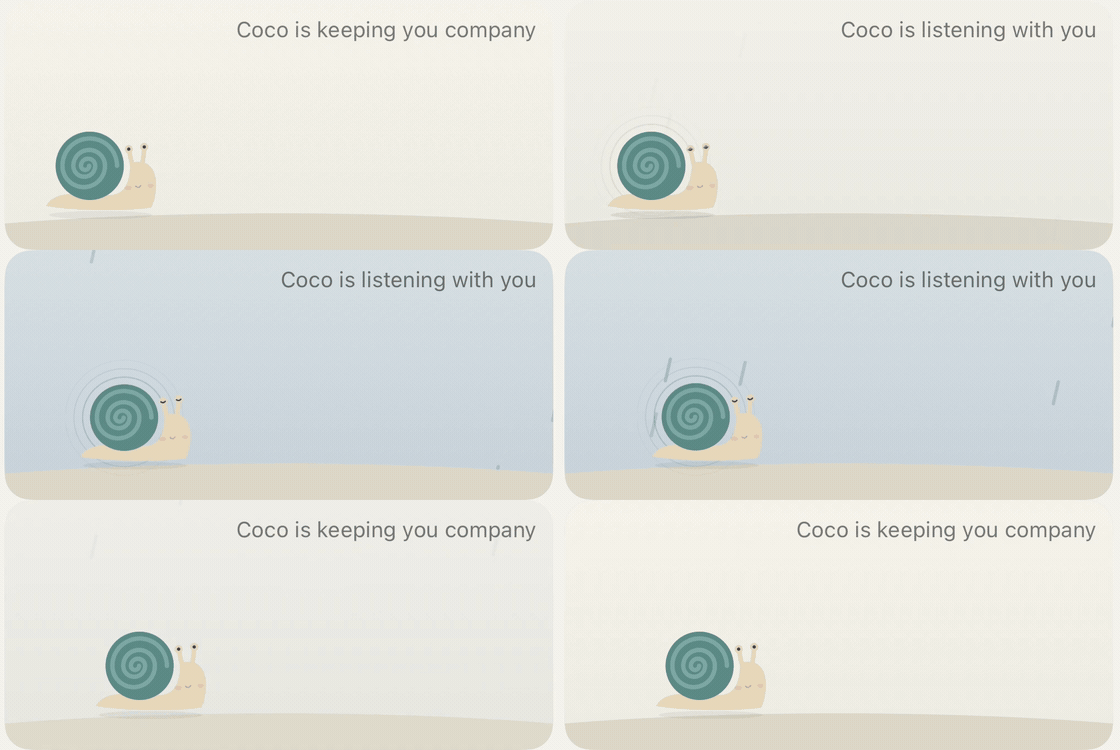
The sounds tab of a tinnitus-relief app has a permanent scene card at the top: Coco the snail stands on flat ground; tap the rain sound and the backdrop becomes a rainy scene while Coco crawls back and forth extremely slowly (90 seconds per round trip); stop playback and the ground comes back. The whole card lives inside TimelineView(.animation(minimumInterval: 1/20)), so its body is recomputed 20 times a second.
Two defects, in the user's own words:
- The first time you tap a nature sound, the snail turns around in place. It never happens on the second or third tap.
- Opening fades in, but closing is abrupt — the background hard-cuts.
The second one is a design problem. The first one is a real bug, and it took two rounds to bottom out.
Why SwiftUI's Built-in Transitions Don't Work Here
Some context first, or the code below looks like reinventing a wheel.
The card originally used .transition(.opacity) with withAnimation for backdrop changes. In practice the fade fired intermittently, and essentially never on the first switch. SwiftUI transitions depend on the state change happening inside an animated transaction, and TimelineView recomputes the body every 50ms — that recomputation swallows the transaction, overwriting the pending transition with the next frame's non-animated one before it ever starts.
The conclusion: inside a TimelineView, do not rely on SwiftUI's implicit or explicit animation. The timeline hands you t every frame anyway, so compute the progress from t yourself.
The Skeleton: Animation State as a Pure Function of Time
So every moving part on the card became a small value-semantics state machine that exposes nothing but f(t) -> value:
/// Crawl clock: phase survives walk-stop-walk (stop where you are, resume in place)
struct WalkClock: Equatable {
    private(set) var frozenPhase: Double = 0   // phase while stopped (0..1, one triangle round trip)
    private(set) var origin: Double?           // phase origin while moving (nil = stopped)

    func phase(at t: Double, period: Double) -> Double { ... }
    mutating func start(at t: Double, period: Double) {
        guard origin == nil else { return }
        origin = t - frozenPhase * period      // resume from the frozen phase
    }
}
Two more follow the same shape: AmplitudeRamp (smoothstep ramp for the wiggle amplitude) and SceneFade (crossfade progress). All of them are structs, side-effect free, and touch no SwiftUI, so they drop straight into unit tests — an accidental win, since animation logic is normally the least testable part of a view.
The render layer only feeds t in:
let phase = clock.phase(at: t, period: Self.walkPeriod)
let tri = phase < 0.5 ? phase * 2 : 2 - phase * 2   // triangle wave 0→1→0
let facingRight = phase < 0.5
...
.scaleEffect(x: facingRight ? 1 : -1, y: 1)         // facing is a mirror
.offset(x: 16 + tri * travel, y: -10)
Look at that facingRight line: facing direction is a discontinuous function of phase, at 0.5 and at 0. An infinitesimal difference in phase produces a full mirror flip. That property is the whole story below.
First Diagnosis: The Paused Timeline
Round one landed on TimelineView's paused argument. The code said paused: !animated — pause the timeline when nothing is playing, to save power. The problem is that timeline.date freezes while paused and resumes from the frozen instant, while clock.start(at:) used Date(), the real wall clock.
If the user sat on the page for 40 seconds before tapping rain, the two clocks were 40 seconds apart: origin landed 40 seconds in the future relative to timeline.date, the computed phase came out negative, and it wrapped to roughly 0.55 — snail facing left, halfway across, then crawling on to phase 1 before flipping back. That explains "it slides left, then turns around."
The fix was paused: reduceMotion, letting the timeline run whenever Reduce Motion is off so both clocks agree. Written into the project's lessons file. Done.
Then the user came back: still turning around.
The Real Root Cause: A Modulo Turns ε Into the Worst Possible Error
Round one squeezed the skew from 40 seconds down to one frame — but not to zero, and this bug doesn't need 40 seconds. It only needs the skew to be negative.
origin = Date() is the wall clock at the instant of the tap. The moment state changes, SwiftUI recomputes the body, and that recomputation receives the previous frame's timeline.date, which is necessarily earlier than Date(). So on that first frame, t - origin is a small negative number, a few dozen milliseconds.
Then it hits this line:
let raw = ((t - origin) / period).truncatingRemainder(dividingBy: 1)
return raw < 0 ? raw + 1 : raw    // ← here
The +1 normalizes a negative phase into 0..1, which is not wrong in itself. But it turns -0.0005 into 0.9995 — numerically the phase furthest from zero. That is exactly what wraparound does: on a ring, the negative neighborhood of 0 is the positive neighborhood of 1, so an error of ε is rendered as a coordinate of 1-ε.
For position it doesn't matter: tri = 2 - 2 × 0.9995 ≈ 0.001, about 0.3 pixels of horizontal offset, invisible. For facing it's a disaster: facingRight = phase < 0.5 evaluates to false, scaleEffect(x: -1) — the entire snail mirrors. The next frame, t catches up with origin, phase becomes 0.0001, and it flips back.
One 50ms full-body mirror. The eye catches it easily, and it reads as "turning around in place."
Why only the first time? Because origin = t - frozenPhase * period. On a cold start frozenPhase == 0, so origin equals "now" exactly — the largest value it can take — and one frame of negative skew is just enough to push the phase across the zero boundary. On the second tap frozenPhase is already 0.02, or 0.3, so origin sits seconds or tens of seconds in the past and a single frame can't reach across.
This bug's survival condition is that the starting point sits exactly on the seam of the ring — and a cold start necessarily puts it there.
Measured: Make the App Print Both Clocks
The reasoning above is self-consistent, but "timeline.date must lag Date()" is not something you can read out of the documentation — SwiftUI never promised which instant the timeline hands you, and it could reasonably hand you the next frame's presentation time. If it did, elapsed would always be positive and this article's root cause would be void on the spot. So don't reason. Measure.
Read both clocks inside the TimelineView body, and run the old and new formulas side by side:
enum FlipProbe {
    static func tick(t: Double, walkOrigin: Double?, period: Double) {
        guard let o = walkOrigin else { return }
        let now = Date().timeIntervalSinceReferenceDate
        let elapsed = t - o
        let old = WalkClock.legacyPhase(elapsed: elapsed, period: period)  // raw < 0 ? raw + 1 : raw
        let new = max(0, elapsed) / period
        print(String(format: "skew=%+.5f elapsed=%+.5f | old=%.5f %@ | new=%.5f %@",
                     t - now, elapsed,
                     old, old < 0.5 ? "→R" : "←L",
                     new, new < 0.5 ? "→R" : "←L"))
    }
}
One run in the simulator, with code starting the rain sound automatically at the 4-second mark (so no hand-tap timing luck is involved):
base #01..#15  skew(t-now) = -0.00001 … -0.02717      ← all 15 frames negative
armed  walkOrigin=808935265.34566
#01  skew=-0.01543  elapsed=-0.01517 | old=0.99983 ←L | new=0.00000 →R
#02  skew=-0.02723  elapsed=+0.03483 | old=0.00039 →R | new=0.00039 →R
#03  skew=-0.01057  elapsed=+0.08483 | old=0.00094 →R | new=0.00094 →R
Three questions answered at once:
timeline.dateconsistently lags the wall clock — 0.5ms typically, 15–27ms occasionally, and not one of the fifteen frames ran ahead. It gives you the time of the frame just rendered, not a future presentation time.- The body evaluation triggered by the state change has a negative
elapsed(-0.015s), exactly as reasoned. - On that frame the old formula returns
0.99983and decides "facing left." The new one returns0, facing right. The very next evaluation (#02) recovers.
Between #01 and #02 the wall clock advanced 62ms (0.03483 + 0.02723), meaning the mirrored state lived on screen for roughly four 60Hz refreshes — not a theoretical instant, but something genuinely visible. Put the old formula back in the driver's seat and step through a screen recording frame by frame:

Those middle four frames are 66ms, matching the 62ms the log computed.
One trap on the side, which nearly made me publish the opposite conclusion: the mov that xcrun simctl io recordVideo produces has non-monotonic timestamps, so ffmpeg's trim=start= selects frames by pts and lands somewhere else entirely. My first pass cut what I thought was the right window, found nothing but normal frames, and nearly concluded "rendered but never presented." Convert to constant frame rate with -fps_mode cfr -r 60 before trimming and it lines up. Before you use a screen recording as evidence, confirm the second you cut is actually the second you think it is.
The Fix: One Clamp
func phase(at t: Double, period: Double) -> Double {
    guard let origin else { return frozenPhase }
    // t can be slightly earlier than origin: origin comes from the wall clock at the
    // moment of the event, but on a state change SwiftUI first recomputes the body with
    // the previous (earlier) timeline date. Unclamped, the negative phase wraps to ≈1.0
    // and facing flips instantly — that is the in-place spin right after you tap.
    let elapsed = max(0, t - origin)
    return (elapsed / period).truncatingRemainder(dividingBy: 1)
}
Clocks only move forward, so a negative elapsed is always clock jitter rather than real semantics. Clamp it to zero.
Worth noting: the other two state machines in the same file (AmplitudeRamp.value, SceneFade.progress) already had a p <= 0 guard, because their progress runs monotonically 0→1 and naturally has to handle "hasn't started yet." Only WalkClock was missing it — precisely because it's periodic. When you write a cyclic phase, the word in your head is "wrap," not "hasn't started."
The Other Half: No Fade-Out, Only Fade-In
The second defect is worth covering, because its fix is counterintuitive too.
The natural way to write a crossfade is "old one fades out, new one fades in" — but while both layers are partially transparent, the base color shows through for a moment, and it reads as a wash-out. The correct layer order is:
ZStack {
    // Old scene sits underneath at full opacity, still animating
    if let outgoing = fade.outgoing, !fade.isSettled(at: t) {
        sceneLayer(outgoing, t: t, width: geo.size.width)
    }
    // New scene fades in on top by the time-computed p, until it covers
    sceneLayer(fade.current, t: t, width: geo.size.width).opacity(p)
}
Fade-in only, no fade-out. The old layer stays 100% opaque underneath and leaves the view tree only once it is fully covered. Total opacity is 1 at every instant, so nothing can show through.
With that layer order in place, fixing "closing is abrupt" isn't a matter of adding a fade-out — it's routing the close through the same fade-in path. When playback stops, "flat ground" is just another scene; it fades in and covers the rain. The old code had a special case, groundFade = 0, to make stopping feel decisive. Deleting the special case made opening and closing symmetric immediately.
One detail: the outgoing layer must keep animating during the transition. The rain keeps falling and the waves keep rolling, they just get covered — freeze the old layer's time to 0 and it reads as "the rain stops, then disappears," which is worse than a hard cut. So each layer decides independently whether it moves, based on its own scene:
let time = (!reduceMotion && (layerScene != .ground || isWalking)) ? t : 0
The end result:
Where This Applies (and Where It Doesn't)
- Only write this way inside something with its own clock, like TimelineView or CADisplayLink. In ordinary views, use
withAnimation; don't complicate a simple animation for the sake of purity. - The price is implementing your own easing for everything. This code uses smoothstep (
p*p*(3-2*p)), which is plenty; if you want a spring you have to solve the spring yourself, at which point SwiftUI's animation system is the better deal. - The power
pausedsaves may not be worth a second clock. If you really must pause, replace everyDate()with thetthreaded down fromtimeline.date. Never mix the two.
The Portable Lessons
In a circular coordinate system — phase, angle, time-of-day, ring-buffer index — a modulo translates a tiny negative error into the largest possible positive one. On a line, -0.0005 and 0 are 0.0005 apart; on a ring they are 0.9995 apart. So for any "quantity + modulo" pair, ask first: can this quantity go slightly negative from clock jitter, floating-point error, or a clock step backward? If it can, clamping versus wrapping has to be a deliberate decision, not whatever x < 0 ? x + 1 : x you typed on autopilot.
The corollary: don't let a discrete decision straddle the discontinuity of a continuous quantity. facingRight = phase < 0.5 binds a full visual flip to a numeric boundary, so any jitter near that boundary is amplified into a 100% visual change. Either guarantee the number can't jitter (what we did here) or give the decision some hysteresis — don't leave it bare.
And the most general one: two clocks in one animation is a bug waiting to happen. Round one took the gap between the two clocks from 40 seconds to 40 milliseconds, which felt like "basically aligned" — but this bug triggers on the sign, not the magnitude. Shrinking an error is not fixing it. It's fixed only once the error's sign is impossible.