Claude Prompt Caching Guide: Reduce Repetition, Cost, and Latency
Prompt caching is one of the clearest ways to make repeated Claude requests cheaper and faster. Anthropic's official documentation describes it as a way to reuse static prompt prefixes such as system instructions, tool definitions, examples, and background context instead of sending the same material again on every request.
That matters most when your workload keeps repeating the same setup. If you are running the same agent, the same rubric, or the same reference material many times, prompt caching can remove a lot of wasted input tokens without changing the final answer.
This article originally only covered the theory. On 2026-09-10 I added a hands-on section at the end: real API calls, the same 28K-token system prefix sent 21 times, reading the three cache fields in usage, end-to-end latency, time to first token, and the bill converted at official prices. The short version: the cost win is an order of magnitude ($0.0719 → $0.0058 per request on a hit), the latency win at this scale is only about a hundred and fifty milliseconds.
What prompt caching is good for
Prompt caching works best when part of the prompt stays stable across many requests:
- System instructions that rarely change
- Tool definitions that stay the same
- Long background context
- Few-shot examples
- Reusable reference documents
Anthropic's feature overview also places prompt caching alongside other production features such as batch processing, citations, and files support. That is a useful clue: this is primarily an API optimization feature, not a chat trick for casual users.
The basic idea
The workflow is simple:
- Put stable content at the beginning of the request.
- Mark the end of the reusable section with
cache_control. - Send later requests with the same prefix so Claude can reuse the cached content.
Anthropic recommends placing static content in a consistent order: tools, then system, then messages. The longest matching prefix is reused automatically, so you usually do not need to place cache breakpoints everywhere.
A practical setup pattern
Use prompt caching when your request has two parts:
- A reusable foundation, such as instructions, schema, examples, or source material.
- A changing task, such as a new user question or new document.
For example, a support triage agent might keep the same role instructions, escalation rubric, and response format in cache while swapping the incoming ticket body on each run. A document analysis workflow might cache the reference documents once and then ask different questions against them.
Important limits to know
Prompt caching is not a general shortcut for every request. Anthropic documents several practical limits:
- The prompt must be long enough to qualify for caching.
- Exact matches are required for cached prefixes.
- Caches are isolated by organization.
- Empty text blocks cannot be cached.
- Thinking blocks cannot be cached directly.
There is also a time-to-live behavior. Anthropic supports a default short-lived cache and an extended one-hour option for some use cases. If you are designing a production workflow, you should verify which models and cache durations are currently supported before relying on them.
When caching helps most
Prompt caching is especially useful in workflows like:
- Multi-step agents that reuse the same instructions
- Internal tools with fixed rubrics
- Long context analysis where source material rarely changes
- Repeated batch jobs with the same setup
It is less useful when every request is completely different. If the system prompt, examples, and context all change every time, there is little to reuse.
Common mistakes
The most common mistakes are straightforward:
- Caching content that changes too often
- Assuming different prompt wording will still hit the same cache
- Marking too little content as reusable
- Treating prompt caching as a replacement for good prompt design
Caching only helps if the stable part of the request is actually stable. A messy prompt stays messy even when it is cheaper.
A simple rule
If you find yourself copy-pasting the same instructions, examples, or reference material into many Claude requests, that content is probably a caching candidate.
Hands-on: the same 63KB system prefix, sent 21 times
Background
I had been explaining the theory above for half a year without ever looking at what cache_read_input_tokens actually shows in a real response, or working out what "90% cheaper" means in cents for one request. More importantly, the docs list "cheaper" and "faster" side by side, and nobody had measured for me whether those two wins are the same size in my environment.
Analysis
Three things have to be measured separately to prove caching works:
- Evidence of a hit lives in exactly one place:
input_tokens/cache_creation_input_tokens/cache_read_input_tokensin the responseusage. The first request should show creation > 0 and read = 0; the second should be the reverse. Without those fields everything else is guesswork. - Latency has to be decomposed. End-to-end time mixes network round trips, the proxy hop, queueing, and generation, and caching only touches the prefill part. So beyond end-to-end, I also stream and measure time to first token, with a tiny request without a long prefix as the baseline.
- Cost is converted at the official pricing page: Claude Sonnet 5 input $2 / MTok, 5-minute cache write $2.50 (1.25×), cache hit $0.20 (0.1×), output $10 (pricing, checked 2026-09-10).
Approach and choices
- Model:
claude-sonnet-5. I hit/v1/modelsfirst to see what the proxy actually serves. Opus 5 and Fable 5.1 were excluded: 2.5 to 5× the price for the same tokens, and this experiment needs no intelligence at all. Haiku 4.5 was excluded because its minimum cacheable prefix is 4096 tokens, the highest threshold of any current model, so its results would not generalize. - Material: the first 45 lines of this site's
docs/CHANGELOG.md, 63,010 bytes, 35,262 characters, 28,207 tokens bycount_tokensincluding the user message. A real long Chinese document. Random filler was excluded: the tokenizer shreds noise into tiny pieces, inflating the count and representing no real workload. - Cold/warm control: a one-line nonce at the top of the system block, changed every round. The first request in a round is guaranteed cold; the next two reuse the nonce and share the prefix. "Wait 5 minutes for expiry" was excluded: too slow and the TTL boundary is fuzzy.
- Fixed output: thinking disabled,
max_tokens: 16, and the user message is just "Reply with the single word OK." All 21 requests produced exactly 4 output tokens, so any latency difference can only come from the input side. "Ask the model to summarize the document" was excluded because output length would be random. - Node's built-in
fetchagainst/v1/messages, no SDK, so the request body is fully visible:cache_controlsits on the last block of thesystemarray. - Auth goes through an Anthropic-compatible proxy (
Authorization: Bearer+anthropic-version: 2023-06-01; this machine has no API key). That adds a hop to every latency number, which the TTFT run measures explicitly.
The request body (the nonce line changes per round):
{
  "model": "claude-sonnet-5",
  "max_tokens": 16,
  "thinking": { "type": "disabled" },
  "system": [
    {
      "type": "text",
      "text": "[bench 20260910T0211 prefix A1]\n\n<63KB of CHANGELOG text>",
      "cache_control": { "type": "ephemeral" }
    }
  ],
  "messages": [{ "role": "user", "content": "Reply with the single word OK." }]
}
The run
The script runs three groups with an 8-second gap between requests:
- Group A: 5 rounds × 3 requests with
cache_control. Each round is 1 cold request (fresh nonce) + 2 warm requests (same nonce). - Group B: 2 rounds × 2 requests, the same prefix twice, without
cache_control, as the control. - Group C: pre-warm demo. First request with
max_tokens: 0(writes the cache, generates nothing), then a normal request that reads it.
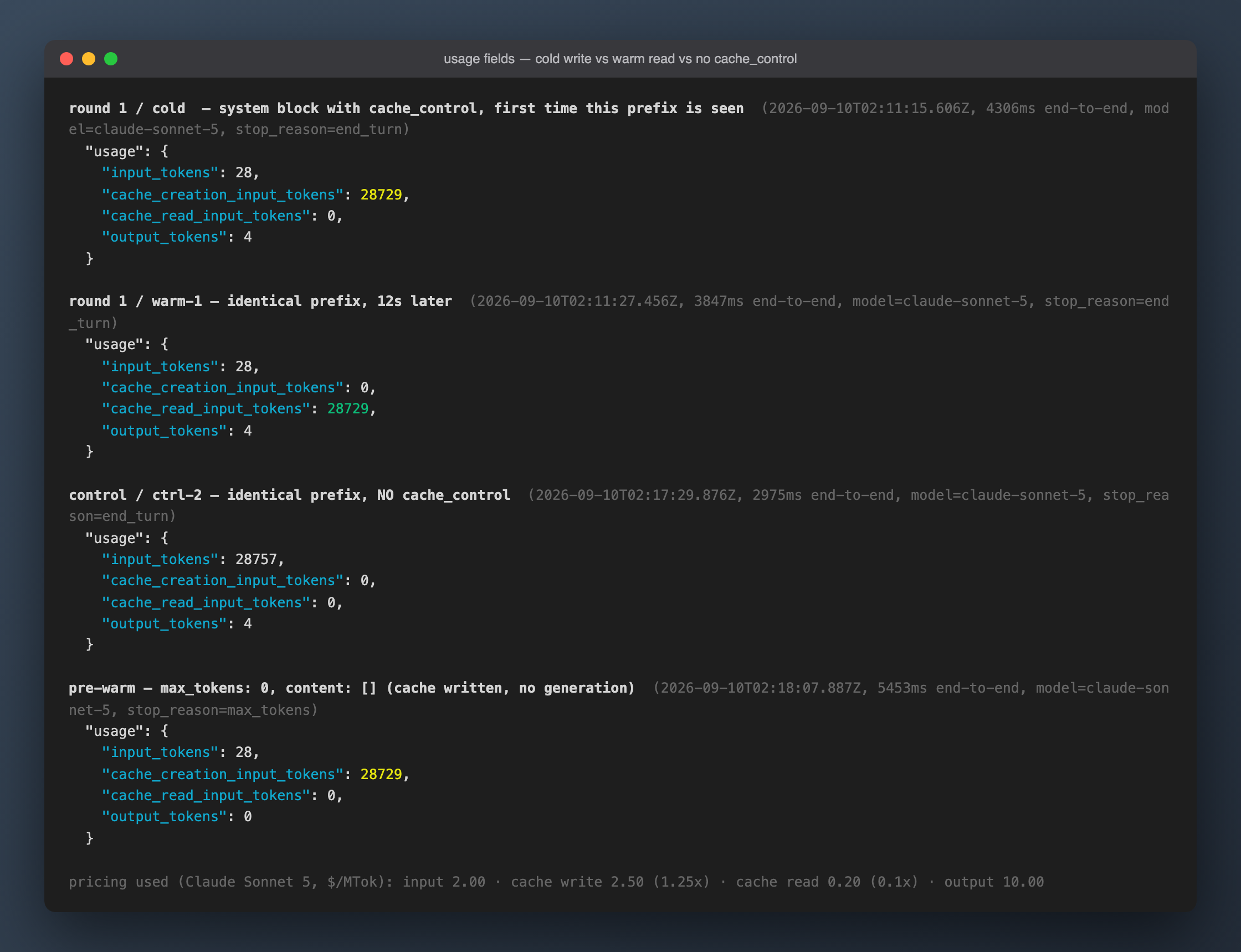
The three raw usage objects side by side are the one picture this article most wants you to see:
Results
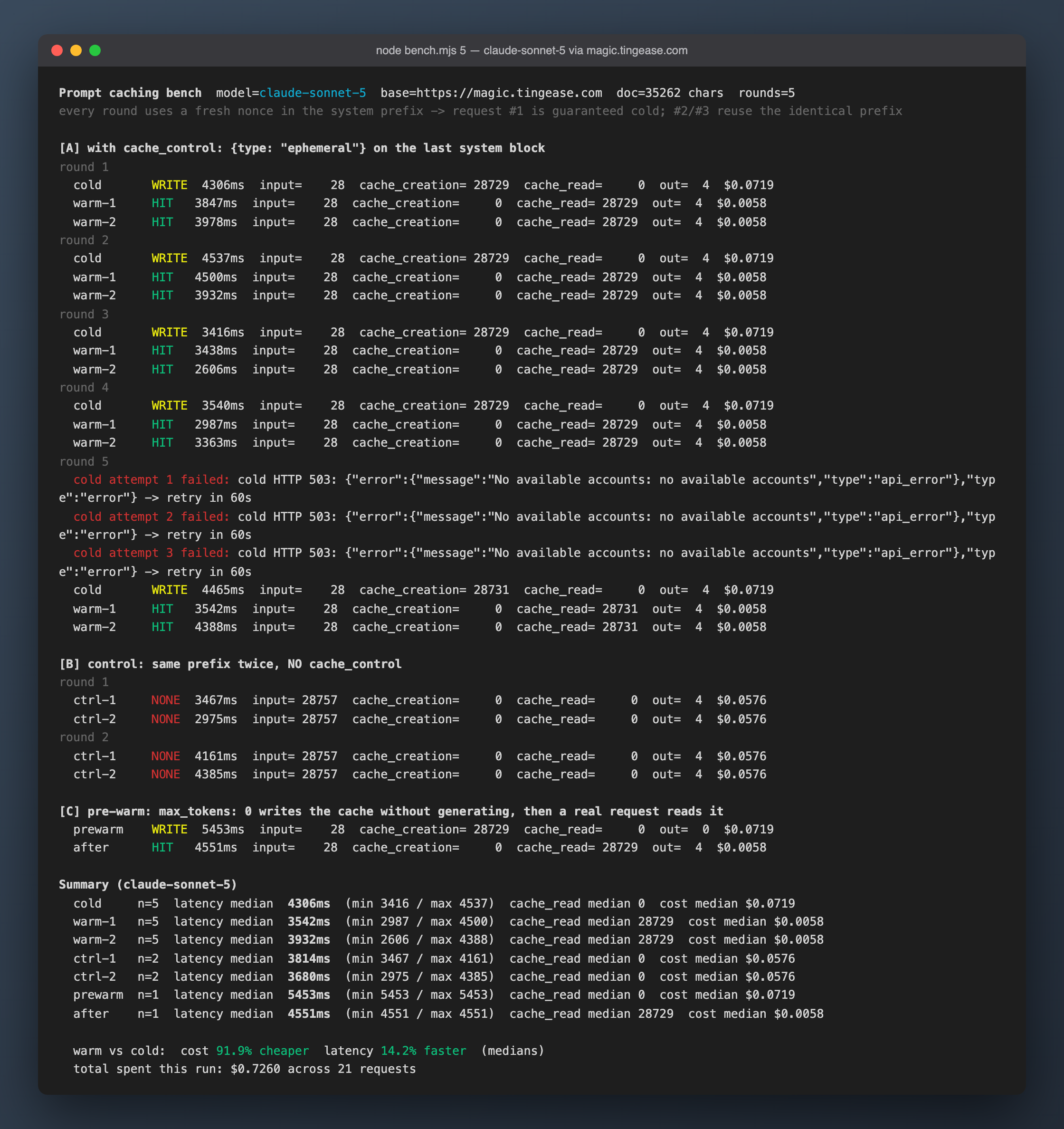
100% hit rate. All 5 cold requests show cache_creation_input_tokens = 28729, all 10 warm requests show cache_read_input_tokens = 28729, and warm input_tokens drops to 28 (just the user message). The 4 control requests all show input_tokens = 28757 with both cache fields at 0. In other words the whole system prefix, plus whatever the proxy injects, went into the cache, and only the user message stayed outside it.
Per-request cost at official prices (the 4 output tokens are negligible):
| Request type | input | cache_creation | cache_read | Cost per request | End-to-end median |
|---|---|---|---|---|---|
| Cold (cache write) | 28 | 28,729 | 0 | $0.0719 | 4,306 ms |
| Warm (cache read, n=10) | 28 | 0 | 28,729 | $0.0058 | 3,695 ms |
| Control (no cache_control, n=4) | 28,757 | 0 | 0 | $0.0576 | 3,814 ms |
The arithmetic:
- A warm request is 91.9% cheaper than a cold one and 90% cheaper than the uncached control.
- A cold request costs 25% more than uncached ($0.0719 vs $0.0576). That is the cache-write premium.
- Same prefix sent twice: $0.0777 cached vs $0.1152 uncached, so it pays back on the second request. Ten times: $0.1241 vs $0.5760, 78% saved.
- The whole experiment (including a smoke run and the TTFT group, 36 requests) cost about $1.3.
The latency win is much smaller than I expected. End-to-end median improved only 14% (4,306 → 3,695 ms), with a lot of jitter: in round 2 the warm request took 4,500 ms against 4,537 ms cold. So I added a streaming run measuring time to first token, with a tiny request (no system prompt) as the baseline:
| Request | TTFT median | Range |
|---|---|---|
| Tiny (no system, baseline, n=2) | 2,674 ms | 2,668 – 2,680 |
| Cold (cache write, n=3) | 2,964 ms | 2,847 – 3,169 |
| Warm (cache read, n=3) | 2,816 ms | 2,657 – 3,036 |
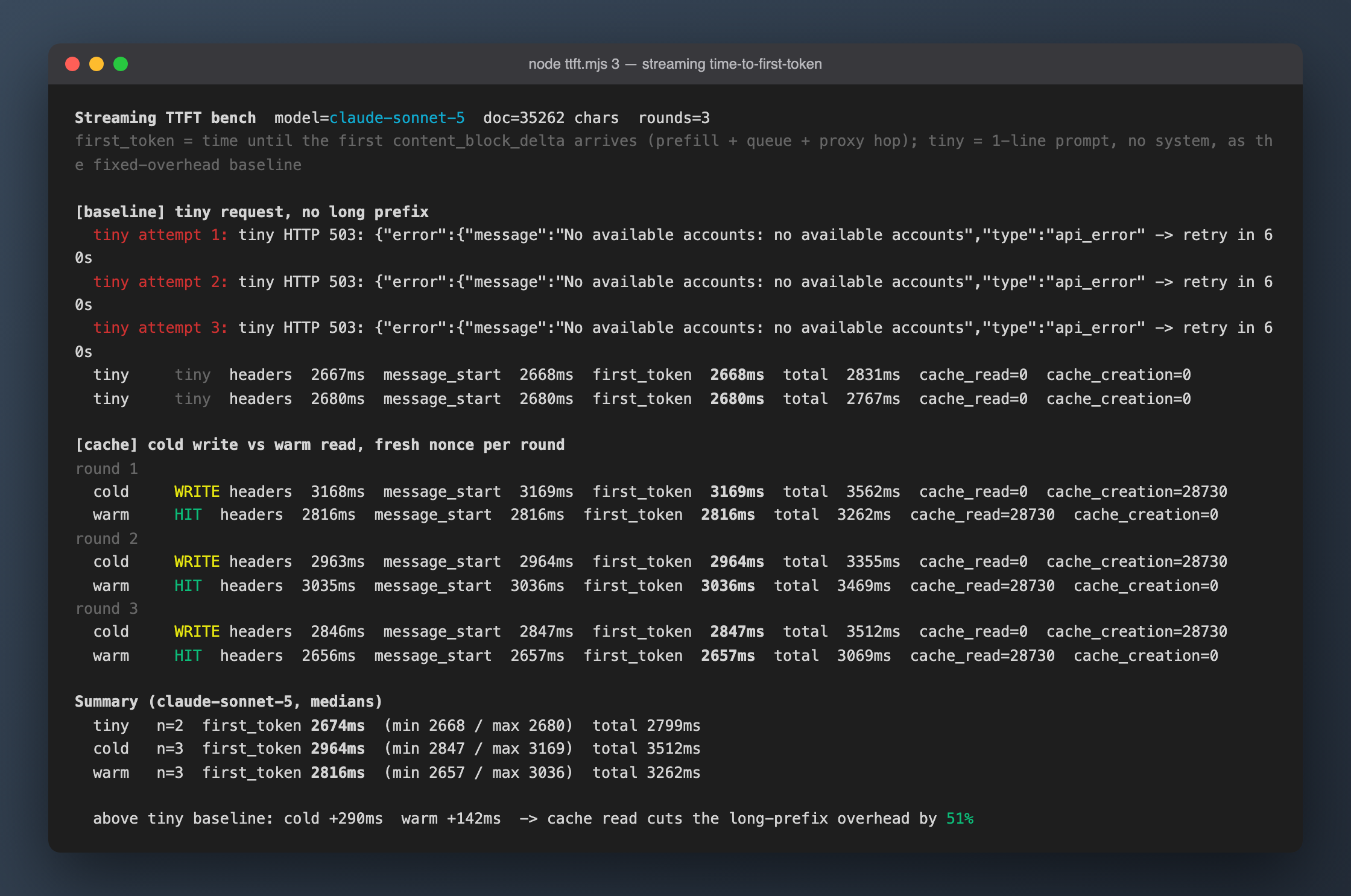
Two things fall out of that chart. First, the fixed overhead on my path is 2.7 seconds: even a bare "hi" takes 2.7 seconds to first token, which is the proxy hop plus cross-border network and has nothing to do with caching. Second, the 28K-token prefill on Sonnet 5 only adds about 290 ms, and a cache hit cuts that to about 142 ms. Half, yes, but 150 ms in absolute terms. At tens of thousands of tokens and behind a proxy, prompt caching is a cost feature, not a speed feature. The latency benefit should grow with longer prefixes and a more direct path, but I did not test that, so no claim.
max_tokens: 0 pre-warming works. The first group C request returned stop_reason: "max_tokens", output_tokens: 0, cache_creation_input_tokens: 28729, and the normal request right after it read cache_read 28729. Fire one of these before cold start and the user's first request already hits the cache.
Pitfalls
- The proxy returned 503
No available accounts, unrelated to caching. Right after the 7-request smoke run, every request failed with 503, even a bare "hi"; it happened again on the round-5 cold request and at the start of the TTFT group, and each time it recovered on its own after about 3 minutes. The root cause is not fully confirmed. The pattern (triggered by a burst of 28K-token cold requests, not by short prompts, recovering after a fixed few minutes) looks like the upstream account entering a rate-limit cooldown, during which the proxy has no account to route to. Fix: an 8-second gap between requests and a 60-second backoff with up to 4 retries on 503. A retried cold request must use a fresh nonce, otherwise, if the previous attempt reached upstream and wrote the cache, the retry is no longer cold. - Do not blame the feature for the first 503. My first
max_tokens: 0pre-warm happened to land on a 503 and I nearly wrote "the proxy does not support max_tokens 0". The second run was fine. Check the environment before blaming the feature for the same error code. - The proxy injects roughly 500 tokens into the prefix. A bare "hi" with no system prompt bills
input_tokens: 516;count_tokenssaid my material was 28,207 but the bill said 28,757. The extra 550 is the injected content plus the nonce line. It sits inside the cached range (warminput_tokensis only 28), so it does not hurt the hit. Lesson: whencache_readdoes not match your own token count, suspect the middle layer before suspecting yourself. - Cutting a file by bytes breaks UTF-8.
head -c 40000split a Chinese character in half and the script died withUnicodeDecodeError. Cut Chinese material by lines (head -n). - Single-round latency numbers mean nothing. End-to-end jitter (2.6 to 4.5 s) is an order of magnitude larger than the caching benefit (about 150 ms), and in 5 rounds a warm request was slower than the cold one at least once. Take medians, and strip the fixed overhead with a tiny request, otherwise you cannot tell whether to believe "14% faster" or "51% faster".
The scripts live in the repo under tmp/2026-09-10-prompt-caching/ (bench.mjs for end-to-end and cost, ttft.mjs for streaming first token). They read credentials from the local Claude Code settings.json; swap in your own API key and they run as is.
Official References
- Prompt caching
- Pricing (cache write / hit multipliers)
- Features overview
- Model Context Protocol (MCP)
Sources for the theory sections were reviewed on March 29, 2026; the benchmark and pricing check were done on September 10, 2026. Feature availability, model support, and pricing details can change, so confirm current behavior in the linked official Anthropic resources.