Turn a Home Mac mini Into an Always-On Claude Code Workstation: claudecodeui + SSH Reverse Tunnel, Take Over Sessions From Any Browser
The Mac mini at home stays on around the clock: Claude Code manages the workspaces of five or six projects on it, and long tasks routinely run for tens of minutes. The problem is that I'm not always home — when I'm out, how do I check where a task is, approve a permission request, or hand it a new job?
The goal is specific: from any device with a browser, open a URL, log in, and see and operate the Claude Code sessions on the Mac mini. No client install, no VPN — it has to work on an office computer and on a phone.
This setup has been live for a week and is in daily use. The article follows the real decision order: two selection rounds first (which web UI, which transport), then the full working configuration, then actual screenshots and operating numbers, and finally the pitfalls already hit.
Selection Round One: Which Web UI
There are four ways to "operate Claude Code in a browser." I ruled them out one by one until the last:
The official web version (claude.ai/code): eliminated first. It runs in Anthropic's cloud sandbox and operates on a copy of the code inside that sandbox — whereas what I need is to operate the local workspaces on the Mac mini: local repos, local .env files, local CLIs that are already logged in. They are simply not the same thing.
ttyd + tmux (terminal-in-a-browser): architecturally entirely feasible — hang a tmux session on a web page via ttyd and you have a remote terminal. But five minutes of using it on a phone tells you where the problem is: typing into a terminal on a touchscreen is torture — arrow keys, Ctrl combos, scrolling back through output, every one of them is awkward. What it gives you is "a remote screen," not "an interface designed for mobile."
code-server (VS Code in the browser): works, but roundabout. It is fundamentally an editor, and Claude Code still has to run inside its integrated terminal — so you're wrapping a heavy shell (memory measured in GB) around a worse terminal experience, and the mobile layout is basically unusable.
claudecodeui (open source, 13.5k stars): the final choice. The decisive point is its data model —
claudecodeui does not maintain its own session state — it reads the session JSONL files under
~/.claude/projects/directly. That means a Claude Code session you start in the terminal is the same one you see on the web; conversely, a session started from the web is right there when you get back to the computer and runclaude --resume. The web UI is just another view of the same data — there is no separate ledger of "web sessions" versus "terminal sessions."
That one property hits my core scenario dead on: what I take over while out is the very session I opened in the terminal before leaving, not a fresh one started from scratch. The other points in its favor:
- Mobile-first UI: a project-list drawer, a session stream, a bottom input bar — designed for a phone screen, not a desktop layout squeezed down
- Auth built in: JWT login + bcrypt passwords, and the login endpoint is a natural fit for an extra rate-limit layer at nginx (config below)
- More than chat: a built-in file browser (with editing), a git panel, and a real terminal (WebSocket) — a fallback for whatever chat can't solve
- Open source and forkable: this paid off within the week — on day two I hit an upstream bug, forked it, and fixed it myself (see "Pitfalls")
Its measured footprint is light: a single Node process with RSS stable at around 170MB — imperceptible on a Mac mini that still has real work to run.
Selection Round Two: Why an SSH Reverse Tunnel, Not Tailscale
Home broadband has no public IP — that's the starting condition. The textbook answer for "reach a machine at home from outside" is Tailscale, but for this specific need — a web entry point reachable from any browser — an SSH reverse tunnel wins on four dimensions:
1. Zero install on the accessing side (decisive). Tailscale's model is "devices join the network": every accessing device installs a client and logs into an account. A phone can do that; an office computer often isn't allowed to, and a borrowed device certainly won't. The output of SSH tunnel + nginx is an ordinary HTTPS URL, usable by anything with a browser. "Zero install" isn't a nicety — it determines in how many real-world situations this entry point is actually available.
2. A network path you control. Tailscale relies on NAT hole punching for direct connections and falls back to DERP relays when punching fails — with carrier-grade NAT common on domestic ISPs plus restrictions on the far end, the punch-through rate is not encouraging, and once it falls back, traffic detours through Tailscale's overseas nodes with latency and stability outside your control. The SSH tunnel's path is fixed and chosen by you: Mac mini → the VPS you picked → you. You know whether the route is good before buying the VPS; when something breaks, ssh -v shows you exactly what — no hole punching, no relays, no third-party control plane, none of the "why is it slow again today" mystery layers.
3. The exposure surface is one port, not a whole machine. Once a machine joins a Tailscale network, the entire machine is reachable within it (every listening port); the trust boundary is "account security + ACLs written correctly." A reverse tunnel exposes exactly one service on exactly one port, and that port listens only on loopback on the VPS — the only thing the public internet can touch is that one URL on nginx. The audit is "are these three doors locked," not "does the ACL of the whole network have a hole."
4. It reuses assets I already have. My VPS already has nginx, automatic certificate renewal, and a logging setup; this plan adds one vhost and one tunnel. Tailscale would introduce a new account system + a resident agent on every device + an ACL configuration language of its own.
Conversely, when Tailscale is the right choice: you only access from your own devices and every one of them can run the client; you want whole-machine capability (remote desktop, SMB, direct SSH); you have no VPS and don't want to maintain one. And one thing that must be said honestly — this plan's entry point is publicly reachable, so security rests entirely on those authentication doors; Tailscale's services are visible only inside the private network, which eliminates an entire class of risk by construction. If your web UI has no reliable authentication, do not run this plan naked.
A word on Cloudflare Tunnel: same idea as this plan (dial out from inside, terminate at an edge) and free — the best alternative if you have no VPS. With a VPS, your own nginx gives you more control over timeout policy, rate limiting, and logs.
Architecture
[Mac mini, home]                    [VPS, public]                    [any browser]
claudecodeui              SSH reverse tunnel      nginx (TLS + rate limit)
127.0.0.1:18300   ────────►  127.0.0.1:18300  ────────►  https://code.example.com
(loopback only)     ssh -R     (loopback only)      reverse proxy
Three key points: the web UI listens only on loopback (even the LAN can't reach it); the tunnel is dialed out by the Mac mini (so home needs no public IP and no router changes); the tunnel's landing point on the VPS also listens only on loopback — the sole public entry is nginx.
Domains, IPs, and usernames in the configs below are placeholders.
Setup: the Mac mini Side
Installing and Supervising claudecodeui
git clone https://github.com/siteboon/claudecodeui.git ~/tools/claudecodeui
cd ~/tools/claudecodeui
npm install && npm run build
Three lines of .env — the key one binds to loopback:
SERVER_PORT=18300
HOST=127.0.0.1
NODE_ENV=production
Use launchd to make it a start-on-boot resident service, ~/Library/LaunchAgents/com.example.claudecodeui.plist:
<?xml version="1.0" encoding="UTF-8"?>
<!DOCTYPE plist PUBLIC "-//Apple//DTD PLIST 1.0//EN"
  "http://www.apple.com/DTDs/PropertyList-1.0.dtd">
<plist version="1.0">
<dict>
  <key>Label</key><string>com.example.claudecodeui</string>
  <key>ProgramArguments</key>
  <array>
    <string>/opt/homebrew/bin/node</string>
    <string>dist-server/server/index.js</string>
  </array>
  <key>WorkingDirectory</key><string>/Users/YOUR_USER/tools/claudecodeui</string>
  <key>EnvironmentVariables</key>
  <dict>
    <key>PATH</key><string>/opt/homebrew/bin:/usr/local/bin:/usr/bin:/bin</string>
    <key>HOME</key><string>/Users/YOUR_USER</string>
  </dict>
  <key>KeepAlive</key><true/>
  <key>RunAtLoad</key><true/>
  <key>StandardOutPath</key><string>/Users/YOUR_USER/tools/logs/claudecodeui/server.log</string>
  <key>StandardErrorPath</key><string>/Users/YOUR_USER/tools/logs/claudecodeui/server.err.log</string>
</dict>
</plist>
An easy trap: the launchd environment does not have your shell configuration — PATH and HOME must be written explicitly, or node won't be found and neither will the claude CLI.
The Reverse Tunnel, Also Under launchd
On macOS you don't need autossh — launchd's KeepAlive is the best supervisor there is. ~/Library/LaunchAgents/com.example.ccui-tunnel.plist:
<?xml version="1.0" encoding="UTF-8"?>
<!DOCTYPE plist PUBLIC "-//Apple//DTD PLIST 1.0//EN"
  "http://www.apple.com/DTDs/PropertyList-1.0.dtd">
<plist version="1.0">
<dict>
  <key>Label</key><string>com.example.ccui-tunnel</string>
  <key>ProgramArguments</key>
  <array>
    <string>/usr/bin/ssh</string>
    <string>-N</string>
    <string>-o</string><string>ExitOnForwardFailure=yes</string>
    <string>-o</string><string>ServerAliveInterval=30</string>
    <string>-o</string><string>ServerAliveCountMax=3</string>
    <string>-R</string><string>127.0.0.1:18300:127.0.0.1:18300</string>
    <string>tunnel@203.0.113.10</string>
  </array>
  <key>KeepAlive</key><true/>
  <key>RunAtLoad</key><true/>
  <key>ThrottleInterval</key><integer>15</integer>
</dict>
</plist>
Why the parameters are set this way:
-R 127.0.0.1:18300:127.0.0.1:18300: using the same port on both ends keeps things simple; write the127.0.0.1:prefix explicitly so the landing point on the VPS never listens publiclyExitOnForwardFailure=yes: if the forward fails to establish, make ssh exit cleanly instead of holding a dead connection while pretending to be alive — only after it exits does launchd know to restart it. Without this, a dropped tunnel plays dead-alive while you fume from outsideServerAliveInterval=30+CountMax=3: a dead link is detected and exited within 90 seconds — broadband blips and modem re-dials self-heal through thisThrottleInterval=15: don't retry frantically while the network is down
A note on keys: under launchd, ssh looks for ~/.ssh/id_ed25519 at the default path, and it must have no passphrase (or be pre-loaded into the Keychain), otherwise unattended connection fails.
Don't Let the Mac mini Fall Asleep
sudo pmset -a sleep 0 disksleep 0   # machine never sleeps (display can)
sudo pmset -a autorestart 1          # power back on automatically after an outage
Setup: the VPS Side
nginx: TLS + WebSocket + Login Rate Limiting
This is the actual config running in production (domain redacted). The two easiest things to miss are both commented — the WebSocket upgrade headers and the long-connection timeouts:
map $http_upgrade $connection_upgrade {
    default upgrade;
    ""      close;
}

# Brute-force protection on the login endpoint: 10 requests per IP per minute
limit_req_zone $remote_addr zone=ccui_auth:1m rate=10r/m;

server {
    listen 443 ssl;
    server_name code.example.com;

    ssl_certificate     /etc/letsencrypt/live/code.example.com/fullchain.pem;
    ssl_certificate_key /etc/letsencrypt/live/code.example.com/privkey.pem;

    # Separate rate limit on the login endpoint — the entry is on the public internet, this is mandatory
    location /api/auth/login {
        limit_req zone=ccui_auth burst=5 nodelay;
        proxy_pass http://127.0.0.1:18300;
        proxy_http_version 1.1;
        proxy_set_header Host $host;
        proxy_set_header X-Real-IP $remote_addr;
    }

    location / {
        proxy_pass http://127.0.0.1:18300;
        proxy_http_version 1.1;
        # The chat stream and the built-in terminal are both WebSocket — these two lines are non-negotiable
        proxy_set_header Upgrade $http_upgrade;
        proxy_set_header Connection $connection_upgrade;
        proxy_set_header Host $host;
        # Don't let long sessions get cut by the 60s default
        proxy_read_timeout 3600s;
        proxy_send_timeout 3600s;
        client_max_body_size 50m;
    }
}
Certificates issue normally with certbot. If your 443 is already taken by another service (say, SNI-based routing), hang the vhost on an internal port and let the routing layer forward to it — the architecture is unchanged.
Tightening the Tunnel Account
I took the shortcut of reusing an existing ops account. If you create a dedicated one (recommended), pin its privileges down with a Match block in /etc/ssh/sshd_config:
Match User tunnel
    AllowTcpForwarding remote
    PermitListen 127.0.0.1:18300
    PermitTTY no
    X11Forwarding no
    AllowAgentForwarding no
Combined with a nologin shell and key-only login, even a leaked key only grants "the ability to hang a forward on port 18300 of your VPS's loopback" — nothing more.
Verification
# On the VPS: the tunnel landing point must listen on loopback only
ss -tlnp | grep 18300     # must be 127.0.0.1:18300, never 0.0.0.0

# Direct public access to the port must fail
curl -m 5 http://203.0.113.10:18300/   # should time out / be refused
What It Looks Like in Practice
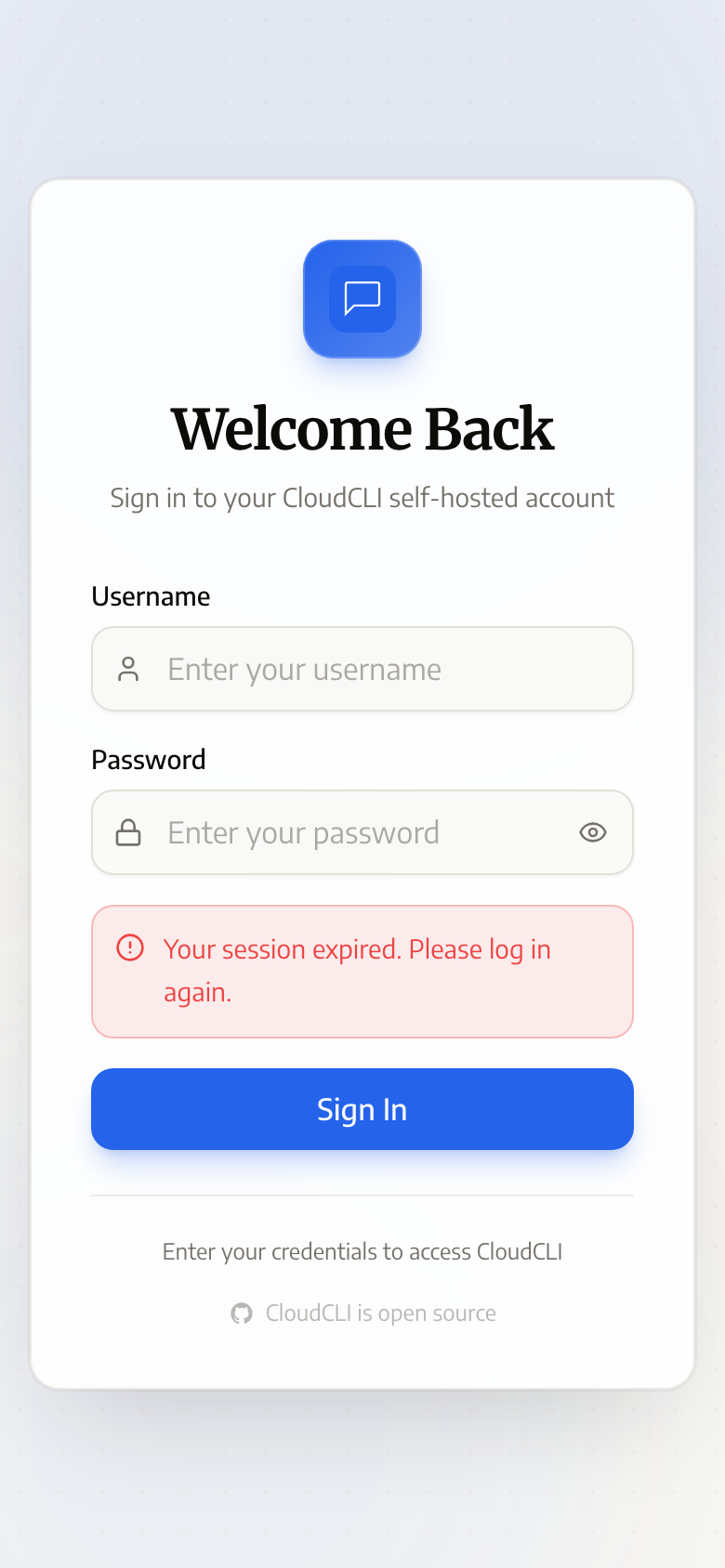
Open the domain in a phone browser — the login page (JWT auth built in, with nginx rate limiting on top):
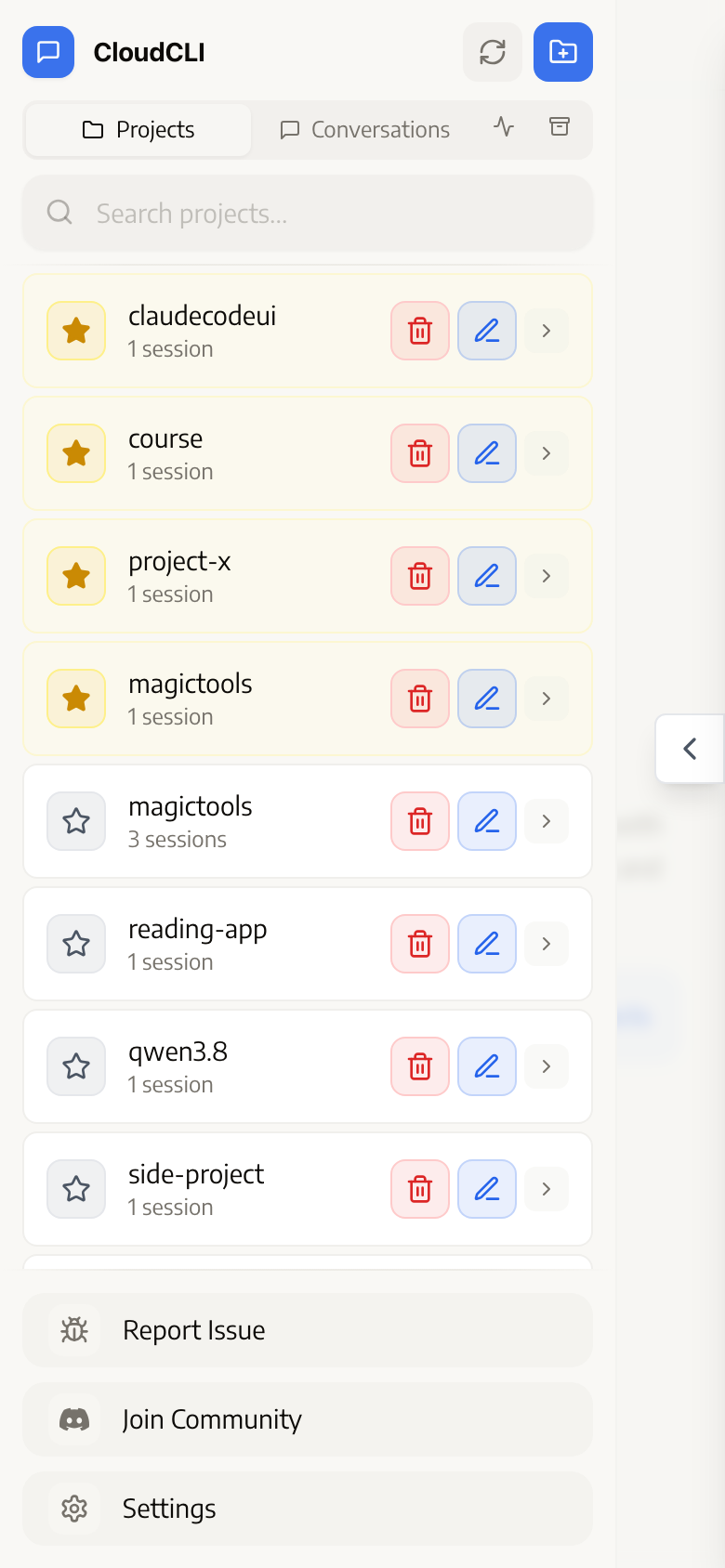
After login, the left drawer is the project list — these are the real projects under ~/.claude/projects: any directory where you've used Claude Code in the terminal shows up automatically, with session counts and stars:
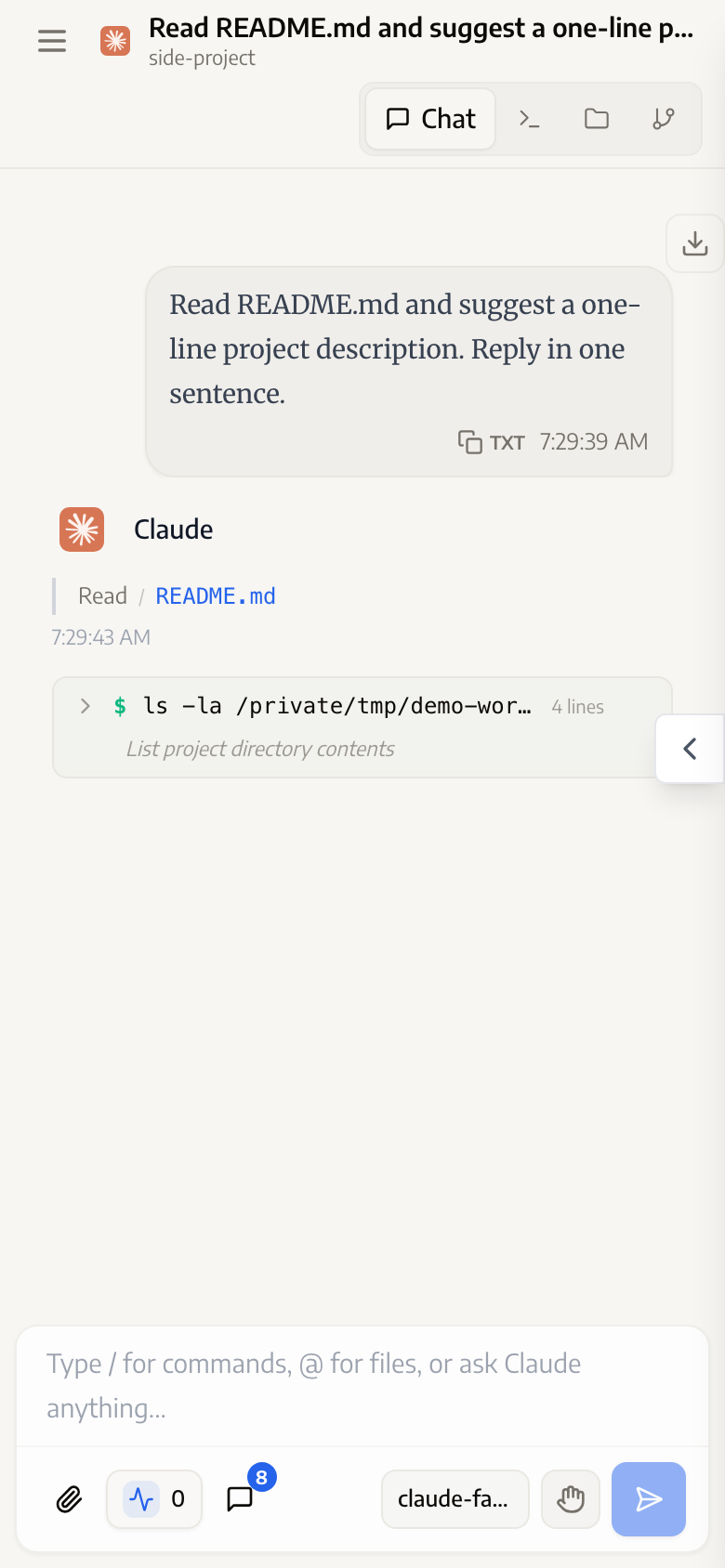
Open a project into a session: the message stream, tool calls (Read/Bash shown collapsed), the bottom input bar and model selector — fully operable on a phone. Checking status, approving permissions, and sending instructions all happen right here:
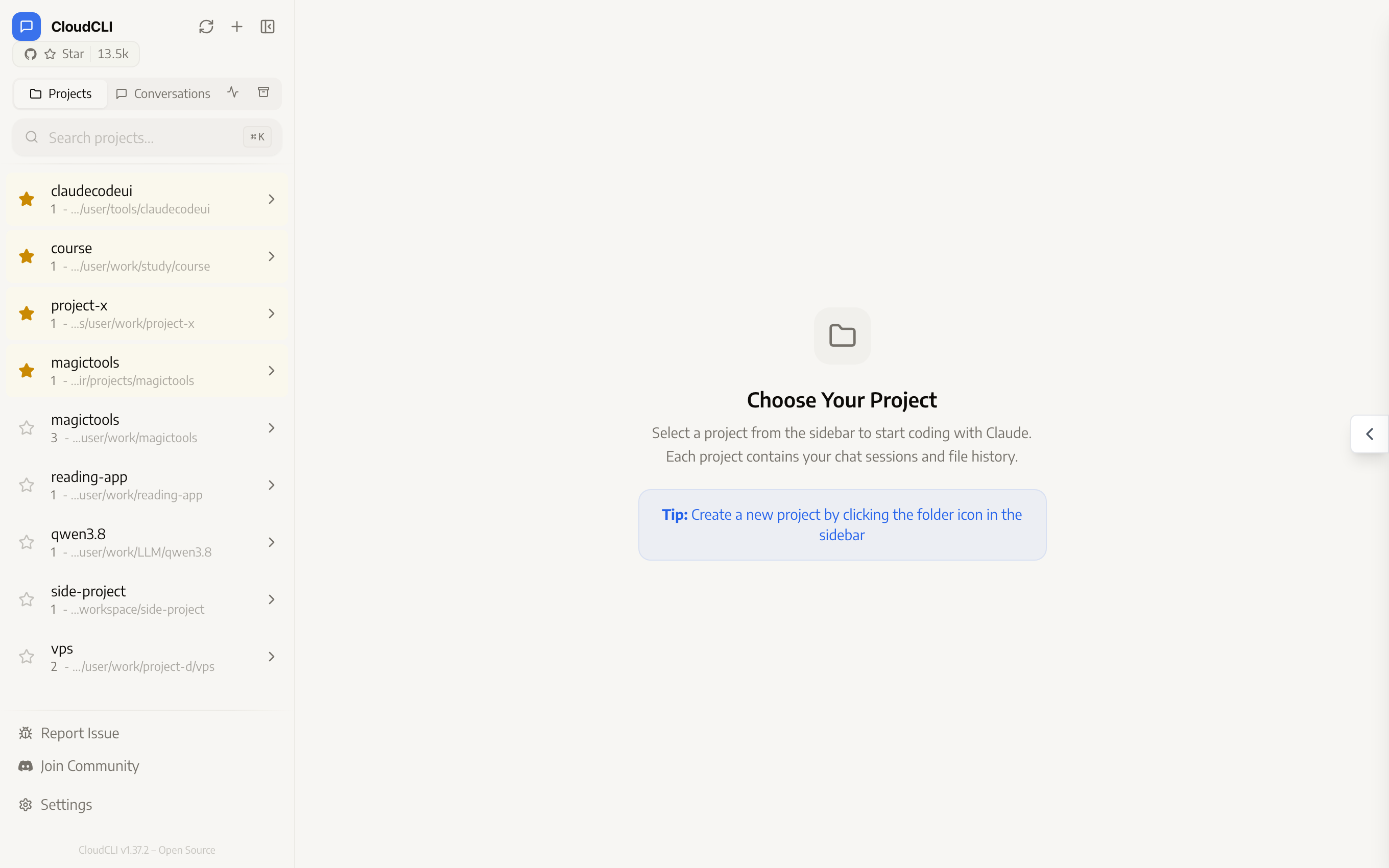
A desktop browser gets the full two-column layout, with the file browser, git panel, and built-in terminal switchable at the top right:
One week of operating numbers (real readings, not estimates):
| Metric | Measured |
|---|---|
| Tunnel stability | A single ssh process online for 5 straight days, 0 lines in the error log, zero manual intervention |
| claudecodeui memory | RSS ≈ 170MB (read after 3.5 days of continuous running) |
| Drop recovery | 90s heartbeat detection + instant launchd restart — perceived as "back within two minutes on its own" |
| What the phone is actually used for | Checking task progress, approving permission requests, sending follow-up instructions; heavy work goes back to the computer |
Pitfalls Hit
The <synthetic> placeholder displayed as a model name. Hit on day two: after an API error in one session, claudecodeui's session list showed the model name as <synthetic>. It turned out to be Claude Code's behavior — it writes locally synthesized placeholder lines into the session JSONL (API-error placeholders and the like), and those lines carry "<synthetic>" in the model field, which claudecodeui's model scan trusted without discrimination. Forked and fixed (any value wrapped in angle brackets is treated as a placeholder and skipped) — three commits, done. This is exactly why "open source and forkable" earned a point in the selection round: with a closed tool, a bug this annoying just sits there until someone else fixes it.
launchd's environment is a clean slate. Both plists tripped on this: without PATH, node and claude can't be found; with a passphrase on the ssh key, unattended startup fails. The rule is one line: anything running under launchd must declare every dependency explicitly — never count on your shell configuration.
Missing WebSocket headers produce a deeply confusing symptom. The page opens, login works, the project list is there — but chat won't send and the terminal won't connect, because all the HTTP requests are fine and only the WebSocket upgrade is being swallowed by nginx. If you see "the UI looks normal but everything real-time is dead," check the Upgrade/Connection headers first.
Security Checklist
Walk through before going live:
- The web UI on the Mac mini listens only on
127.0.0.1 - The tunnel landing point on the VPS listens only on
127.0.0.1(verify withss -tlnp) - Direct public access to the tunnel port fails; only 443 via nginx is reachable
- nginx rate-limits the login endpoint (the entry is public — brute-force protection is not optional)
- The tunnel account has minimum privileges (nologin + Match restrictions + key-only)
-
ExitOnForwardFailure=yesis configured - The claudecodeui password is strong and not reused
FAQ
My home broadband has no public IP — does this work?
Yes; that's exactly what the reverse tunnel is for. The connection is dialed out from the Mac mini to the VPS — the home side only needs to be online. No public IP, no port mapping, no bridge mode on the modem.
Is the session I see on the web the same one as in the terminal?
Yes. claudecodeui reads the session files under ~/.claude/projects/ directly and keeps no independent state. A session opened in the terminal can be picked up on the web, and a session started on the web is there when you run claude --resume back at the computer.
Does a dropped tunnel need manual intervention?
No. The ServerAliveInterval heartbeat detects a dead link within 90 seconds, ExitOnForwardFailure guarantees ssh exits cleanly, and launchd's KeepAlive restarts it immediately. Over five days of testing with several broadband blips, every one self-healed — zero lines in the error log.
Why not just run Claude Code on the VPS?
The workspaces live on the Mac mini: local repos, local credentials, CLIs that are already logged in. Besides, the mini's compute and memory are paid for once; a VPS of the same spec costs money every month. In this architecture the VPS is only the "street address" — the cheapest machine is plenty.
How does it compare to Cloudflare Tunnel?
Same idea (dial out from inside + edge entry) and free — the best alternative when you have no VPS. The differences: traffic passes through Cloudflare's edge (one more third party, with unstable speeds in some regions), and long-lived WebSocket connections are subject to its timeout policy. With your own nginx you have more control.
Can you really get work done on a phone?
Depends on the work. Checking progress, approving permissions, sending instructions, reading diffs: entirely adequate — that's nine-tenths of the away-from-desk scenarios. Writing large amounts of code: unrealistic, the screen and keyboard are what they are. The actual pattern is "supervise and dispatch from mobile, heavy work back at the computer."