Crayfish (OpenClaw) Workbench Dashboard
Crayfish has strong execution capabilities, but there's no good sense of control over what it has done and what it's currently doing. I happened to see a blogger's share, so we can first build a 'Mission Control' to achieve full control! Mission Control is essentially an exclusive workbench that grows out of OpenClaw itself, with the interface as follows:
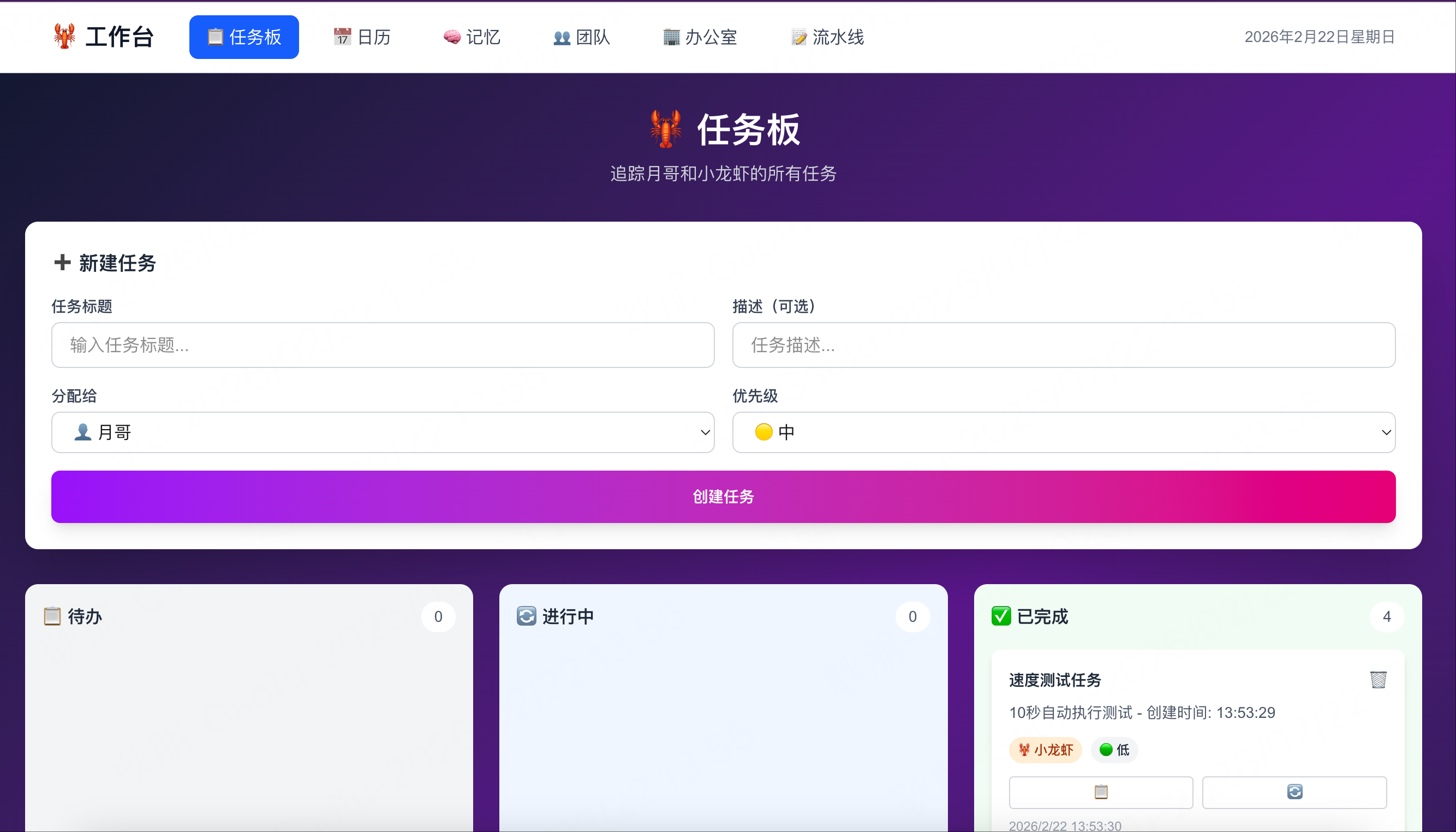
You can track what it's doing in one place, toolify your processes, and upgrade memories from hidden files to a searchable system. The more you use it, the more it fits your workflow, and you don't need to write code manually—just let OpenClaw generate it. It's recommended to fix the tech stack from the start: Next.js + Convex (tell it clearly at the beginning)!
1) Tasks Board|Task Board (Let it start 'proactively doing things')
Purpose: Your work with OpenClaw is made transparent; you can see at a glance who is doing what, at which step, and where it's stuck; it can also see what you're busy with, thus proactively taking over tasks and updating statuses.
Instruction (copy directly to OpenClaw): Please build a task board for us that tracks all the tasks we are working on. I should be able to see the status of every task and who the task is assigned to, me or you. Moving forward please put all tasks you work on into this board and update it in real time. Build it as a Next.js app with a Convex database.
2) Content Pipeline|Content Pipeline (Turn 'distribution' into a system)
Purpose: Break down content creation into a pipeline: Idea → Script → Thumbnail → Filming → Publish. You drop inspiration, and it writes scripts at fixed times daily, generates thumbnails, and moves cards to the next column, reducing the cost of 'restarting repeatedly'.
Instruction: Please build me a content pipeline tool. I want it to have every stage of content creation in it. I should be able to edit ideas and put full scripts in it and attach images if need be. I want you to manage this pipeline with me and add wherever you can. Build it as a Next.js app with a Convex database.(same next.js app with dirrent path)
3) Calendar|Calendar (Verify if it really schedules)
Purpose: Many people think Claw isn't proactive enough, but the actual issue is often 'no visible schedule'. The calendar is your audit panel for its cron jobs/scheduled tasks: whether they are scheduled, when they run, and if they execute successfully.
Instruction: Please build a calendar for us in the mission control. All your scheduled tasks and cron jobs should live here. Anytime I have you schedule a task, put it in the calendar so I can ensure you are doing them correctly. Build it as a Next.js app with a Convex database.(same next.js app with dirrent path)
4) Memory|Memory Bank (Turn memories into searchable assets)
Purpose: Turn every memory it generates into a document collection in the UI and add global search. You no longer rely on remembering to dig through files; instead, you can search past decisions, preferences, strategies, and contexts like looking up information.
Instruction: Please build a memory screen in our mission control. It should list all your memories in beautiful documents. We should also have a search component so I can quickly search through all our memories. Build it as a Next.js app with a Convex database.(same next.js app with dirrent path)
5) Team|Team Structure (Operate OpenClaw like a company)
Purpose: You will repeatedly use different capabilities like development/writing/design/research, etc. The Team page solidifies these commonly used sub-agents into an organizational structure: roles, responsibilities, what they're doing, corresponding memories and tools, making it easy to manage and helping it be more certain about 'who to call to do the work'.
Instruction: Please build me a team structure screen. It should show you, plus all the subagents you regularly spin up to do work. If you haven’t thought about which sub agents you spin up, please create them and organize them by roles and responsibilities. This should be developers, writers, and designers as examples. Build it as a Next.js app with a Convex database.(same next.js app with dirrent path)
6) Office|Digital Office (More about atmosphere, but can enhance operational feel)
Purpose: More like a real-time status overview + organizational efficiency dashboard. Use avatars/workstations to show each agent's current status and task progress; who is idle, who is stuck, who is running a process, visible at a glance, and gives a better feeling of leading a team.
Instruction: Please build me a digital office screen where I can view each agent working. They should be represented by individual avatars and have their own work areas and computers. When they are working they should be at their computer. I should be able to quickly view the status of every team member. Build it as a Next.js app with a Convex database.(same next.js app with dirrent path)
Suggestion: First build out Tasks Board + Calendar + Memory + Team + Office, and you'll immediately feel it transform from a conversational assistant into an operable system. Later, add components bit by bit according to your workflow, and Mission Control will become more and more like your own AI console as you use it.